Blogfield notes
10 Examples of AI in the Workplace for 2026
You start the day with a crowded Slack workspace, a CRM full of half finished records, support tickets waiting for owners, and a calendar that leaves no room for actual work. Before you've had coffee, you've already spent time copying data between systems, searching for context,
You start the day with a crowded Slack workspace, a CRM full of half-finished records, support tickets waiting for owners, and a calendar that leaves no room for actual work. Before you've had coffee, you've already spent time copying data between systems, searching for context, and answering questions someone else could have handled.
That's where an AI coworker changes the shape of the work. A teammate like Frida from Supercenter can be mentioned inside Slack, connect to the tools your company already uses, and return a finished result in the thread. She can log CRM updates, triage tickets, schedule meetings, reconcile revenue data, and monitor business signals without forcing everyone to adopt another dashboard. Teams can also build a personalized bot builder workflow for narrower, repeatable tasks.
The important distinction is between AI that helps you think and AI that completes operational work. Workplace adoption has moved beyond occasional experimentation. A nationally representative U.S. survey found that 39.4% of respondents had used generative AI, while 28% of employed respondents used it for their job. Yet the harder opportunity remains moving information across systems, preserving context, and applying company rules consistently.
Here are ten practical examples of AI in the workplace, with the trade-offs that determine whether each one becomes useful or just another neglected automation.
Table of Contents
- 1. AI-Powered CRM Data Management and Deal Logging
- 2. Revenue Operations Automation and Financial Data Reconciliation
- 3. Customer Support Ticket Triage and Intelligent Routing
- 4. Sales Proposal and Contract Generation with Brand Consistency
- 5. Meeting Scheduling, Calendar Management, and Intelligent Time-Blocking
- 6. Proactive Business Intelligence and Anomaly Detection
- 7. Onboarding Automation and Knowledge Transfer
- 8. Email Management and Intelligent Inbox Organization
- 9. Cross-Tool Workflow Automation and Work Routing
- 10. Consistent Documentation and Process Standardization Across Teams
- 10 AI Workplace Use Cases: Side-by-Side Comparison
- Your AI Coworker Playbook
1. AI-Powered CRM Data Management and Deal Logging
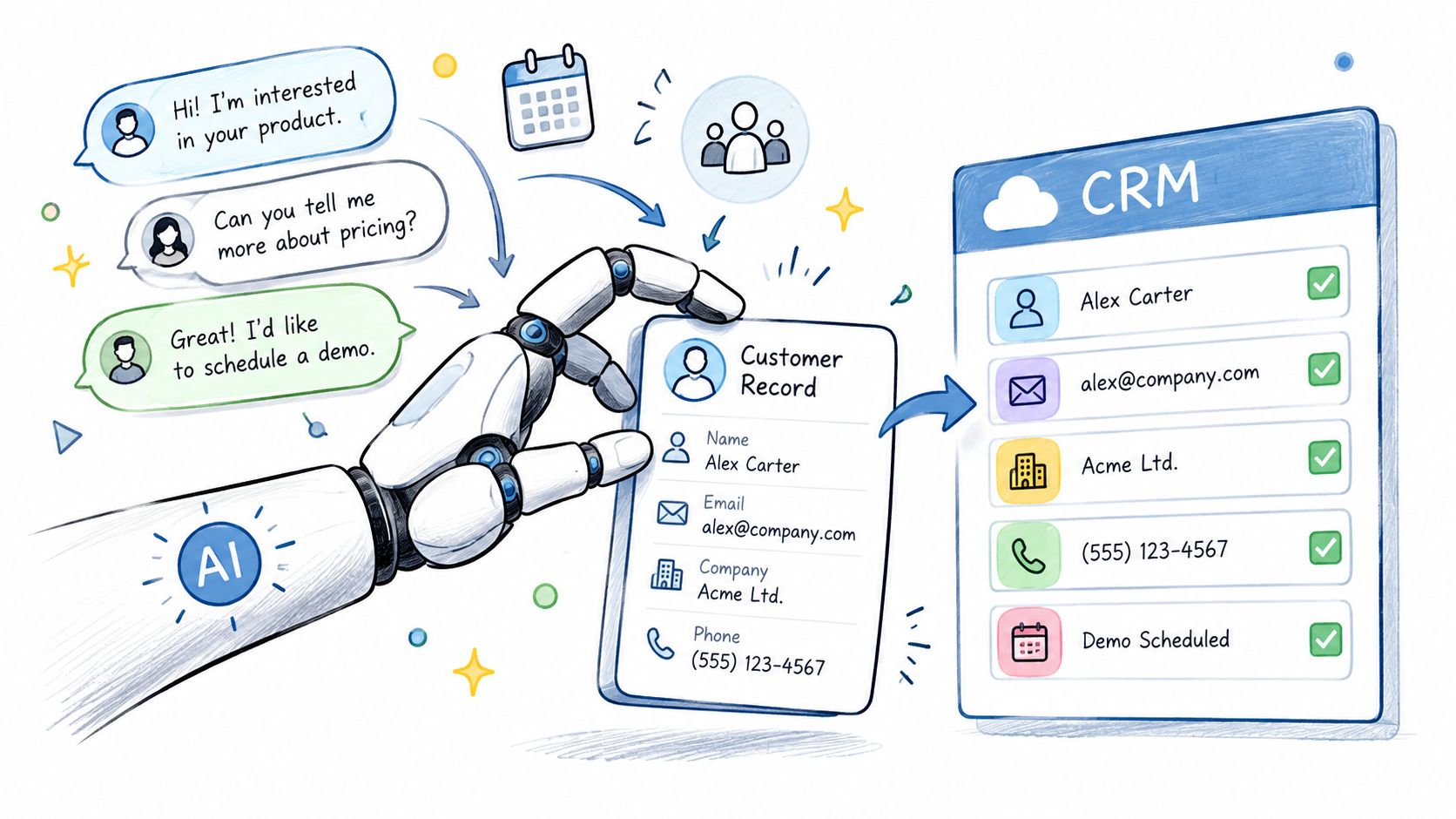
Sales teams rarely object to clean CRM data. They object to the administrative work required to keep it clean. After a discovery call, a rep may know the deal stage, business pain, stakeholders, next step, and likely timeline, but those details often remain in meeting notes, Slack messages, or email instead of reaching HubSpot or Salesforce.
An AI coworker can listen for structured deal information, extract the relevant details, and update the appropriate CRM fields. A Slack message such as “Acme is moving to security review, procurement needs the revised quote, and the target decision is next month” can become a properly formatted opportunity update rather than another forgotten note.
Start with controlled writes
The safest rollout begins with high-confidence fields. Let the coworker capture standard deal stages, next actions, meeting outcomes, and contact details before giving it authority to change forecasts or close dates. Every action should remain visible in an audit trail so revenue operations can inspect what changed, why it changed, and who authorized it.
Give the AI a reference document containing your qualification criteria, deal stages, naming conventions, pricing rules, and forecasting definitions. A reusable skill can encode the company's actual deal framework instead of relying on generic sales assumptions.
Practical rule: Let the AI write only what your team can define clearly. If two sales leaders interpret “committed” differently, the problem is governance, not prompting.
Permissions matter just as much. Configure the coworker to act within the requesting user's CRM access, so a rep can't retrieve or modify opportunities they couldn't reach manually. Revenue operations can then use the same system to audit legacy records, identify inconsistent fields, and standardize data without asking sellers to stop selling.
For integration context, this ERP and CRM integration guide is useful when CRM hygiene depends on finance or operational systems beyond the sales stack.
2. Revenue Operations Automation and Financial Data Reconciliation
Revenue operations sits between systems that were rarely designed to agree automatically. Stripe may show a payout, HubSpot may show recurring revenue, and the accounting platform may contain the invoice that explains the difference. A person then spends hours matching records, investigating exceptions, and assembling a weekly cash position report.
An AI coworker can pull transaction data from Stripe, payment processors, CRM records, and accounting tools, then reconcile the relationships between them. It can match payments to customers, identify overdue invoices, flag missing metadata, and send a concise exception report to finance or RevOps in Slack.
The value isn't just fewer spreadsheet updates. Finance gets a more current view of customer health, collections risk, and unusual payment activity, while sales can see when an account's commercial status doesn't match its CRM record.
Automate the repeatable path
Before connecting financial systems, standardize invoice names, numbering, customer identifiers, product labels, and metadata. AI can reconcile messy information, but it shouldn't be expected to solve every data-definition problem invisibly.
A reliable operating pattern includes:
- A fixed reconciliation routine: Give the coworker a monthly and weekly sequence covering data pulls, matching rules, exception handling, and sign-off.
- A revenue-model skill: Encode whether your business uses subscriptions, usage-based billing, services, renewals, or a combination of models.
- Exception thresholds: Route high-value transactions, duplicate charges, failed payments, and unusual patterns to a named human owner.
- A review trail: Require finance to validate the underlying records before reports become official.
The trade-off is clear. Full automation is attractive, but financial reporting needs traceability. Keep the AI responsible for collecting, matching, and explaining discrepancies. Keep final approval with the people accountable for the books.
3. Customer Support Ticket Triage and Intelligent Routing
A support queue becomes expensive when every request follows the same path. A billing question shouldn't wait behind a suspected product defect, and a critical account issue shouldn't land with an agent who lacks the required product expertise.
An AI coworker can classify incoming requests, extract the important details, check account context, and assign the ticket based on skill tags, current workload, priority, and escalation rules. It can also add a short summary to the thread, giving the assigned agent the customer's problem, relevant history, and likely next step without requiring a separate investigation.
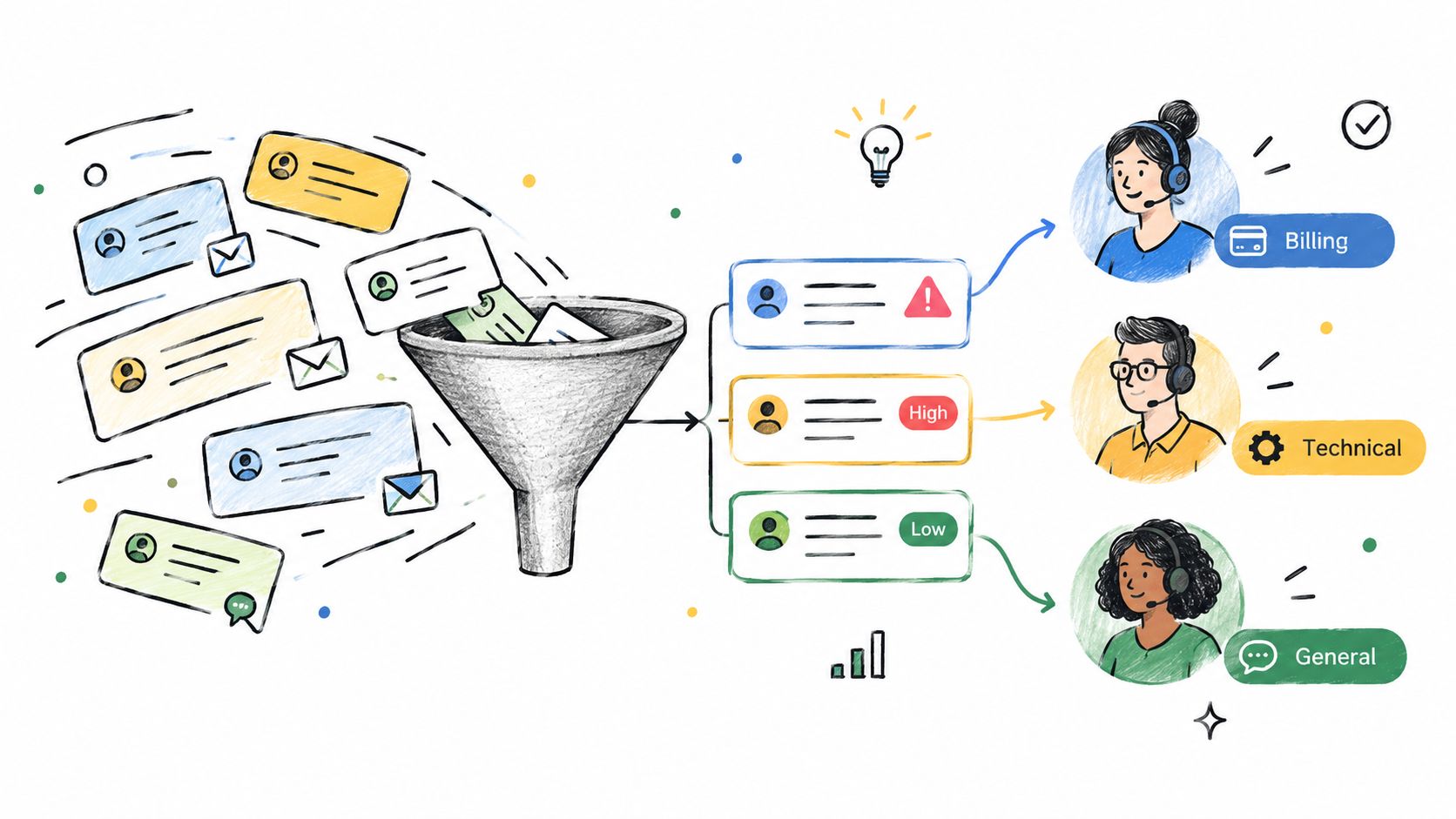
Start with triage and routing, not autonomous replies. Build a reference library of issue categories, internal templates, resolution paths, product terms, and escalation contacts. Then define what each route means. “Technical” is too broad unless the system knows whether that means engineering, implementation, infrastructure, or customer success.
Support leaders should monitor misroutes, reassignment reasons, first-response time, escalation time, backlog age, and the percentage of tickets requiring manual correction. Those measurements show whether the classification logic is improving or merely moving work around.
The customer support automation workflow can help teams think through the handoffs between intake, ownership, internal context, and escalation.
Route confidently, draft cautiously. A wrong owner creates delay, while a wrong customer-facing answer can create a second problem.
Private AI coworkers are useful here because agents can add internal notes and context without exposing that working material to customers. Over time, those notes become training material for better routing, provided managers review them for accuracy and sensitive information.
4. Sales Proposal and Contract Generation with Brand Consistency
Proposal work often begins with structured information that already exists elsewhere. The CRM has the customer name and use case. A pricing system has the package and approved discounts. A knowledge base has the company description, implementation approach, and legal language. The seller still has to assemble those pieces into a coherent document.
An AI coworker can take a Slack request, retrieve the approved information, and generate a proposal, quote, statement of work, or contract draft. It can apply the right customer segment, preserve the company's formatting, and separate fixed boilerplate from variable sections such as objectives, scope, pricing, and timeline.
Separate generation from approval
The best results come from explicit rules. Document discount authority, term variations, approval limits, pricing exceptions, and which clauses require legal review. Store approved proposals in a knowledge base so the AI can learn the company's preferred structure without copying outdated promises.
A practical workflow looks like this:
- Collect the inputs: Customer, segment, products, use case, stakeholders, implementation requirements, and commercial terms.
- Apply the skill: Use pricing logic, proposal structure, tone, and approved language for that customer type.
- Generate a draft: Produce a polished document with assumptions clearly marked.
- Route for review: Send commercial exceptions to sales leadership and legal language to counsel.
- Record the result: Link the final version to the CRM opportunity and preserve the approval trail.
Don't allow the coworker to invent a discount or make an unapproved commitment. The point is to remove assembly work, not to remove commercial judgment. Early proposals should receive human review until the team trusts the rules and the source documents.
5. Meeting Scheduling, Calendar Management, and Intelligent Time-Blocking
Scheduling becomes difficult when a team has multiple time zones, customer preferences, recurring internal meetings, and different definitions of a productive day. A calendar assistant that only finds mutual availability can still create a poor week by filling every open space.
An AI coworker can coordinate demos, one-on-ones, standups, reviews, and cross-functional meetings while applying individual and company preferences. It can protect focus time, avoid lunch, respect working hours, and reschedule a conflict without turning the organizer into a human routing layer.
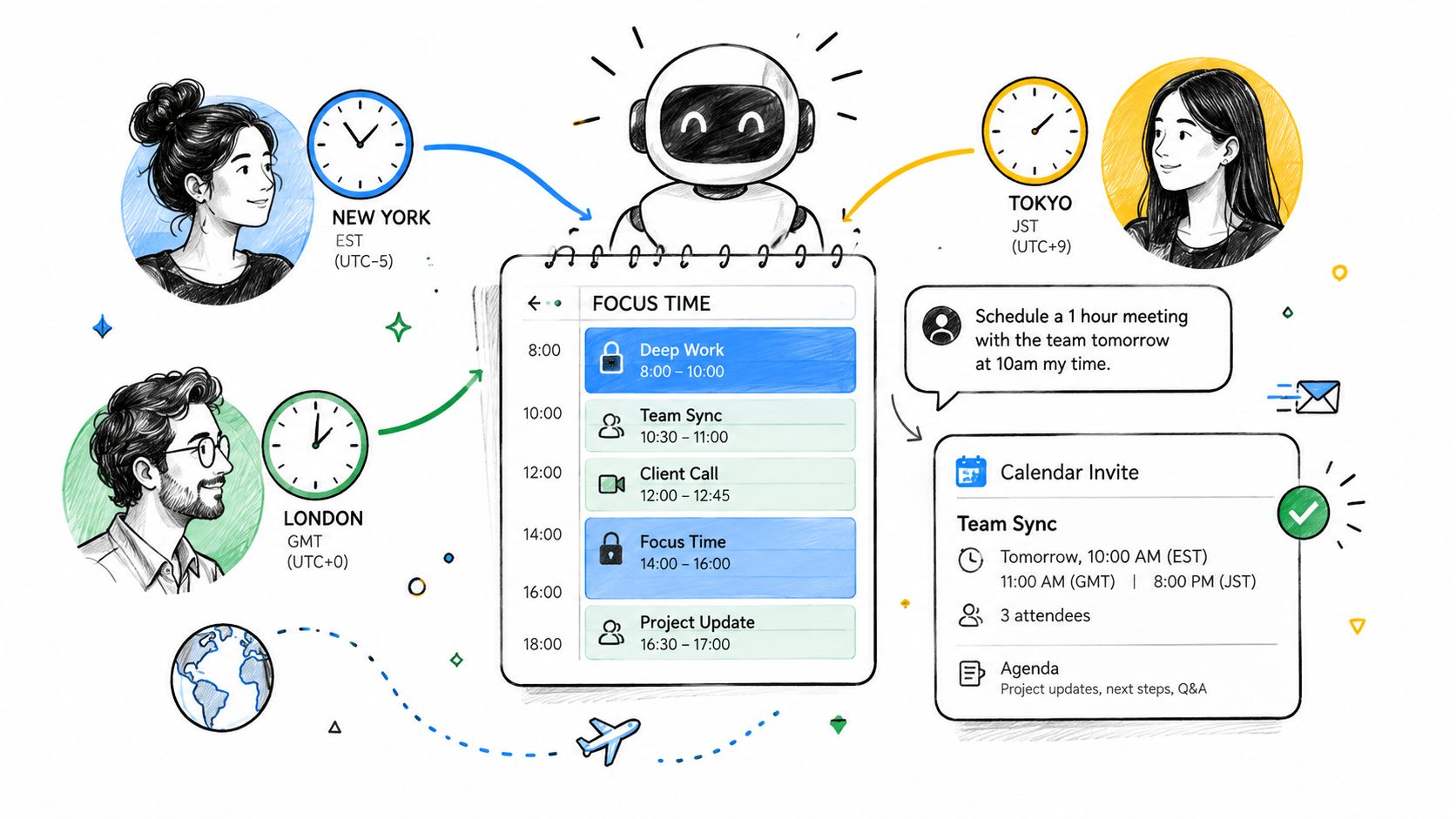
Write the rules down before automating them. “Protect focus time” needs a definition. So does “urgent.” You might specify a default meeting length, protected personal blocks, no-meeting windows, preferred customer hours, and who can override those rules.
Make the calendar reflect work priorities
The coworker can also prepare the meeting rather than merely booking it. Before a customer call, it can gather the CRM record, open tasks, recent support activity, and prior commitments. Before an internal review, it can assemble the relevant project updates and draft an agenda.
Track whether meetings have an owner, agenda, decision, and follow-up task. If a recurring meeting repeatedly produces no decision or action, the AI can flag it for consolidation. That doesn't mean every low-activity meeting should disappear. Some meetings exist for relationship building, coaching, or risk management. The measurement should inform judgment, not replace it.
Teams evaluating this workflow can use Google Calendar automation guidance as a practical reference for calendar-triggered actions.
6. Proactive Business Intelligence and Anomaly Detection
Early signals matter more than late dashboards. A drop in usage becomes actionable when the right person receives context quickly. An AI coworker can connect that change to the account, owner, history, and next action.
For a SaaS company, the workflow might detect declining customer usage, check the account record, and notify the customer success manager with relevant context. Sales leadership could receive a morning pipeline brief highlighting stale next steps, missing decision-makers, or approaching target dates. Marketing teams can get competitor signals and content performance summaries without assembling reports manually.
Access to generative AI recommendations increased productivity by 14% on average, according to the International Labour Organization. The practical value depends on routing those recommendations into the tools where owners already work.
Reduce alert fatigue first
Start with three to five critical metrics. Define each alert's business meaning with the people who own the metric. Every notification should answer four questions:
- What changed: Identify the metric and direction of change.
- Why it matters: Connect the signal to revenue, retention, delivery, or risk.
- Who owns it: Name the responsible person or team.
- What to do next: Suggest a review, outreach, investigation, or escalation.
Historical context prevents normal seasonality from becoming a false alarm. Use prior patterns and business calendars, then let recipients label alerts as useful, premature, irrelevant, or incorrectly routed. Disable noisy rules rather than teaching people to ignore every notification.
A personalized morning briefing usually serves people better than a general company report. A CEO, sales manager, engineer, and customer success manager need different signals. Configure the coworker to tailor each briefing while linking to the underlying CRM, finance, support, or analytics records. Track alert open rates, owner response times, and the share of alerts that lead to a recorded action.
7. Onboarding Automation and Knowledge Transfer
New hires ask the same operational questions repeatedly, but the answers are scattered across documents, Slack threads, recorded meetings, and the memories of a few experienced employees. Managers then spend onboarding time explaining where to find information instead of helping the new person build judgment and relationships.
A private AI coworker can act as an onboarding guide. It can explain CRM stages to a new sales rep, walk an engineer through repositories and architecture documentation, or help a customer success manager understand product terminology and account processes. Because the coworker works inside the team's communication environment, the new hire can ask a question in plain language and receive a link to the relevant source.
Combine self-service with human contact
Create a searchable source of truth before connecting the AI. Include tools, processes, role expectations, key contacts, company vocabulary, security rules, and examples of completed work. Then give the coworker a role-specific 30, 60, and 90-day plan with milestones, dependencies, and check-ins.
AI onboarding works best when it handles orientation and repetition, while humans handle belonging, feedback, and nuanced decisions. Schedule manager one-on-ones, team introductions, shadowing, and live practice alongside the AI workflow.
Ask recent hires which answers were easy to find and which guidance was confusing. Their feedback is often more useful than a manager's assumption that the documentation is clear. Cohort onboarding can add another layer, allowing new employees to share questions and learn together while keeping private employment or performance information separate.
For teams assessing operational use cases, this guide to evaluating AI for B2B operations offers a useful frame for weighing automation against process maturity.
8. Email Management and Intelligent Inbox Organization
An overloaded inbox drains attention before real work begins. A sales manager might need a customer decision from one thread, a finance exception from another, and a product escalation buried in an internal chain. An AI coworker can surface those priorities without forcing employees to process every message chronologically.
Connect the coworker to the email system, Slack, and customer records where appropriate. It can summarize important threads, extract action items, classify messages, and post a focused update to Slack. It can also identify replies that need attention, separate information from decision requests, and prepare drafts for common responses.
Start with read-only summarization. This lets the team test whether the AI preserves context before granting permission to send or archive messages. Define urgency with practical signals, including sender, customer account, subject, deadline, escalation terms, and explicit approval requests. Store the extracted action, owner, due date, and source-thread link so employees can verify every recommendation.
Use a whitelist for executives, strategic customers, key vendors, legal contacts, and other senders whose messages must remain visible. Review filtered messages throughout the initial rollout. Missing one important thread can damage trust faster than saving time on routine email.
Protect the human voice
Templates help with repetitive requests, but sensitive, commercial, legal, or relationship-heavy replies should require employee approval. The AI can provide a concise summary and proposed response. The employee still decides whether the tone, facts, and commitment are appropriate.
Track action-item completion, missed urgent messages, draft acceptance, manual edits, and time spent reviewing summaries. A useful inbox assistant does not pursue an empty inbox. It helps the team identify meaningful work, verify decisions, and spend less time sorting messages.
9. Cross-Tool Workflow Automation and Work Routing
The most valuable workplace automations often look unremarkable. A customer comment in Slack becomes a Linear issue. A HubSpot deal creates a Notion project record. A GitHub update reaches Jira and the portfolio channel. A Stripe refund creates the right customer and accounting records.
This is the glue work between systems. Each step may be simple, but the combined process breaks when someone forgets a field, copies the wrong identifier, or assumes another team has already completed its part.
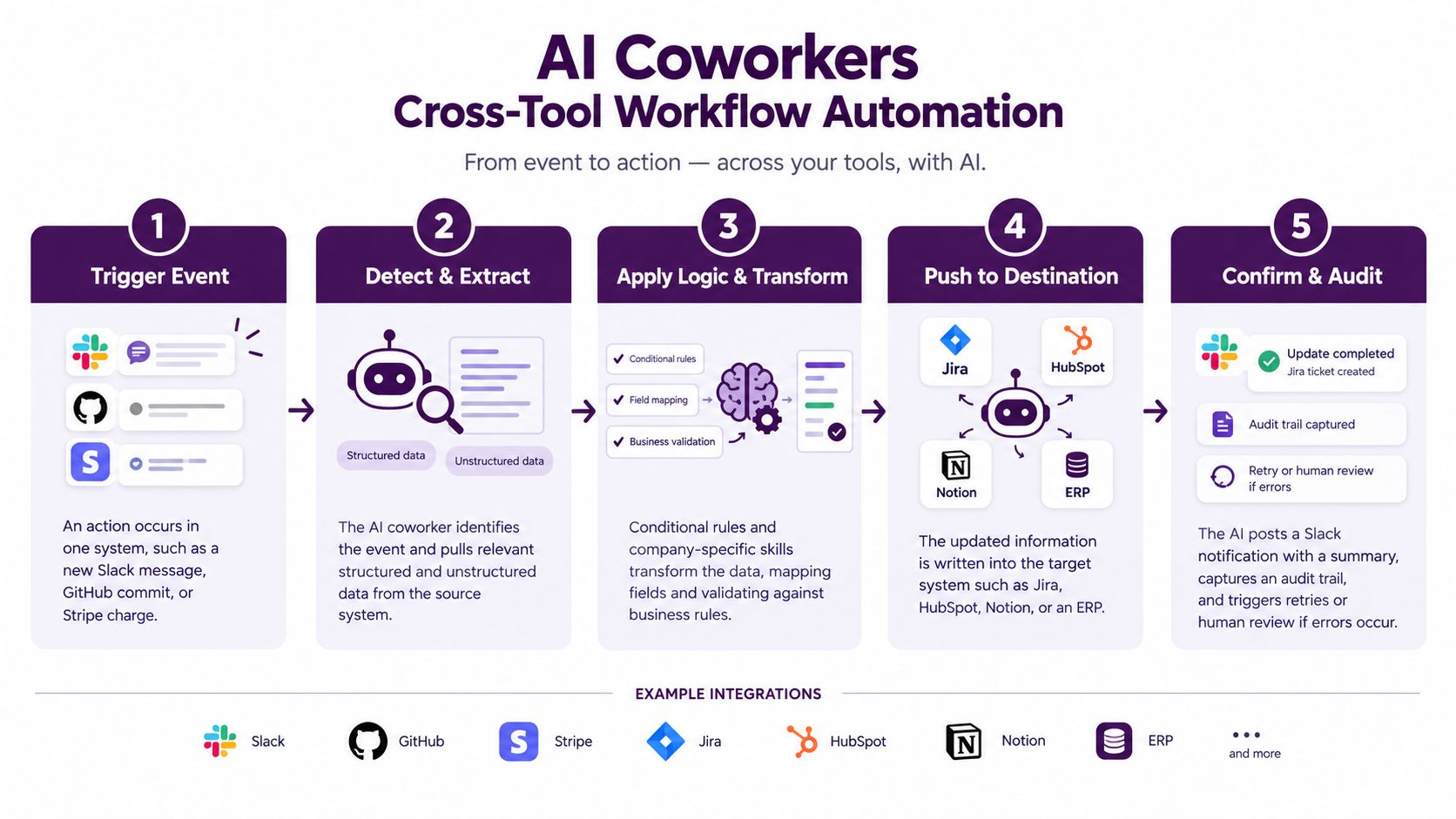
Map the workflow before building it. Write down the trigger, required inputs, transformation rules, destination systems, owner, exception path, and completion signal. Start with high-volume tasks that require little judgment, such as mapping GitHub activity to project records or creating a standardized follow-up task after a sales stage change.
The coworker should return a result that explains what it did. Include record links, changed fields, skipped steps, and errors that require review. During the pilot, keep the audit trail available and compare automated outputs with the records a person would have created.
Build for failure, not just the happy path. A missing customer ID, revoked OAuth permission, duplicate ticket, or changed field name should create a visible exception, not a silent failure.
Create workflow variants for different deal types, customer segments, project categories, or escalation levels. Monitor completion rate, error rate, duplicate creation, manual corrections, and time from trigger to finished record. The AI agent workflow automation guide is relevant for teams designing these multi-step handoffs.
10. Consistent Documentation and Process Standardization Across Teams
Growth exposes process inconsistency. One sales rep follows the approved pricing framework, another uses an old proposal, and a third explains the product in language marketing retired months ago. Customer success managers may score account health differently, while every team believes its own interpretation is standard.
An AI coworker can carry approved company standards into daily work. Reusable skills can define proposal structure, qualification criteria, brand voice, expense policy, health-scoring rules, or documentation format. The coworker then applies those standards whenever someone delegates a task, regardless of which connected tool contains the work.
Turn tribal knowledge into governed skills
Start with the standards that create the most friction. Choose a small set, document each one in a source-of-truth file, and identify its owner. Include examples of acceptable output, edge cases, approval requirements, and the date of the latest revision.
The coworker should not apply process changes without notice. Establish governance so a responsible owner approves updates before they affect proposals, customer communications, financial workflows, or internal policy. Keep an audit trail that shows which version of a skill produced a result.
Consistency doesn't mean every message should sound identical. A sales proposal, customer email, and internal handoff need different formats. The shared standard should define what must remain reliable, such as accurate pricing, approved legal language, required fields, and brand principles, while leaving room for role and customer context.
Celebrate operational improvements that your team can observe, such as fewer review cycles, fewer missing CRM fields, or more consistent health assessments. The goal isn't to make employees follow an AI's preferences. It's to make the company's own best practices easier to apply.
10 AI Workplace Use Cases: Side-by-Side Comparison
| Use Case | Implementation 🔄 (complexity & timeline) | Resources & Integrations 💡 (requirements) | Expected Outcomes 📊 (impact) | Ideal Use Cases ⚡ (where it fits best) | Key Advantages ⭐ |
|---|---|---|---|---|---|
| AI-Powered CRM Data Management and Deal Logging | Medium, 1–2 wk basic; 4–6 wk to optimize; needs mapping & training | CRM APIs (HubSpot/Salesforce), conversation capture, permission scoping, training data | Saves ~5–8 hrs/rep/week; real-time pipeline hygiene; improved forecast accuracy | Active sales teams, revenue ops, high-volume calls needing live logging | ⭐ Eliminates manual entry; improves data quality; reduces context-switching |
| Revenue Operations Automation & Financial Reconciliation | Medium–High, 2–3 wk basic; 6–8 wk for full rules | Deep access to Stripe/payments and accounting systems, security controls, currency/tax logic | Faster reconciliations; reduced DSO; catches revenue leaks; auditable records | Finance/RevOps for subscription billing, monthly close, collections | ⭐ Cleaner financials; proactive anomaly detection; compliance-ready |
| Customer Support Ticket Triage & Routing | Low–Medium, 1–2 wk basic; 3–4 wk tuning for accuracy | Ticketing system access, knowledge base, agent skill/workload data, Slack integration | MTTR/first-response improves 40–60%; fewer misrouted tickets | High-volume support teams, Slack-first triage, tiered support models | ⭐ Faster routing to experts; higher customer satisfaction; reduced admin |
| Sales Proposal & Contract Generation | Medium, 2–3 wk templates; 4–6 wk for pricing/legal logic | Pricing matrices, templates, CRM data, legal-approved language, version control | Proposal time drops from hours to minutes; consistent terms and branding | Sales needing rapid quotes/proposals, contract teams standardizing MSAs | ⭐ Consistent branding and pricing; faster deal cycles; fewer legal loops |
| Meeting Scheduling, Calendar Management & Time-Blocking | Low, 1–2 wk basic; 3–4 wk to encode culture/preferences | Calendar APIs (Google/Outlook), availability data, user preferences, time-zone logic | Cuts coordination overhead ~70–80%; protects focus time; faster scheduling | Distributed teams, sales demos, leaders protecting deep-work blocks | ⭐ Faster scheduling; improved focus; better cross-timezone coordination |
| Proactive Business Intelligence & Anomaly Detection | Medium, 1–2 wk dashboards; 4–6 wk for predictive models | Clean cross-system data (CRM, analytics, billing), modeling, alert tuning | Early problem detection; reduced churn; dynamic, role-specific briefings | Execs, CSMs, sales leaders monitoring pipeline & usage trends | ⭐ Proactive insights; replaces static reports; enables timely interventions |
| Onboarding Automation & Knowledge Transfer | Medium, 2–3 wk doc prep; 4–6 wk to build workflows | Comprehensive docs/KB, HR system access, role-specific curricula, mentor mapping | Ramp time cut from months to weeks (e.g., 6–12 → 2–4 months); consistent onboarding | Scaling orgs hiring frequently, cross-functional role onboarding | ⭐ Scalable, consistent onboarding; frees manager time; improves retention |
| Email Management & Intelligent Inbox Organization | Low–Medium, 1–2 wk filtering; 3–4 wk tuning auto-responses | Email provider APIs (Gmail/Outlook), security controls, whitelist/priority rules | Reduces email volume ~40–50%; surfaces action items and urgent messages | Knowledge workers, sales, support teams overwhelmed by email | ⭐ Less noise; prioritized inbox; automatic summaries and actions |
| Cross-Tool Workflow Automation & Work Routing | Medium–High, 1–2 wk simple; 4–8 wk complex orchestration | OAuth to many SaaS, custom connectors for legacy/ERP, conditional logic, engineering support | Eliminates 10–15 hrs/week per employee of manual work; single source of truth | Organizations with fragmented tool stacks and frequent handoffs | ⭐ Scales ops; reduces human error; enables non-technical automation |
| Consistent Documentation & Process Standardization | Medium, 2–3 wk initial docs; ongoing governance | Source-of-truth documents, versioning, governance, training data | Consistent processes/brand voice; reduced training burden; preserved knowledge | Growing companies standardizing pricing, proposals, brand, workflows | ⭐ Ensures consistency across teams; accelerates scaling; preserves IP |
Your AI Coworker Playbook
These ten examples of AI in the workplace share a common pattern. The AI becomes useful when it can access the systems where work already happens, understand the company's rules, complete several connected steps, and return a result that a person can verify. A chatbot that produces a plausible paragraph is helpful. A coworker that updates the CRM, creates the follow-up task, notifies the owner, and records the action changes the workflow.
Start with the work between tools. Look for tasks where employees copy information from one system to another, reconstruct context from several threads, or prepare routine reports from recurring inputs. These workflows usually have visible triggers, defined outputs, and measurable failure modes. They're better starting points than vague ambitions such as “use AI across sales.”
Choose one owner and one workflow. Document the current process before automating it, including exceptions, approval points, permissions, and the systems involved. Then give the AI narrow authority. It might read support tickets and route them, but not send customer replies. It might draft a proposal, but not approve a discount. It might reconcile payment records, but not sign off on financial reporting.
Measure the work, not just usage. Useful metrics include completion time, manual corrections, routing accuracy, duplicate records, missed escalations, response latency, review effort, and the percentage of tasks that reach a finished state without human rework. Qualitative feedback matters too. Ask employees whether the coworker preserved context, followed the company's process, and reduced interruptions.
Adoption data shows why this distinction matters. A 2024 global employee survey covering more than 7,000 full-time workers found that 55% were using software applications enhanced with AI at work, and 33% used ChatGPT on the job. Marketing and IT reported stronger ChatGPT use than some other functions, but widespread access doesn't automatically create end-to-end workflow transformation. Capgemini's 2024 research on generative AI in organizations also described organizational integration rising from 6% to 24% between 2023 and 2024, a sign that companies were moving from pilots toward operational deployment.
The productivity evidence is encouraging but uneven. In a customer-support field experiment, access to generative AI recommendations increased productivity by 14% on average, while novice and low-skilled agents saw an effect of about 35% and experienced agents saw little change, according to this International Labour Organization review of empirical evidence. That result supports a practical rule: tailor the coworker to the role and the bottleneck instead of assuming the same assistant will help everyone equally.
A separate six-month workplace experiment on email and calendar work found that AI-supported workers spent about two fewer hours per week on email in the second half of the experiment and reduced work outside regular hours. The study on AI support for email and calendar work also reported lower Outlook session time and faster replies from delivery. The lesson isn't to fill the recovered time with more meetings. Protect it for focused work, customer conversations, analysis, and decisions.
Finally, build trust into the operating model. Supercenter places AI coworkers in Slack and Microsoft Teams, where employees can mention them like teammates. A coworker can act across connected tools through OAuth, use reusable company skills, work proactively on scheduled or event-driven tasks, and maintain an audit trail. Permissions remain scoped to the requesting user, which is essential when the coworker can reach CRM, finance, support, engineering, and communication systems.
A sensible first deployment could be a private coworker for onboarding, a routing coworker for support, or a narrowly scoped RevOps workflow that reconciles records and reports exceptions. Run it with real data, inspect the actions, refine the skills, and expand only after the workflow performs reliably. AI should not sit beside your processes as another place to ask questions. It should help execute the process while keeping people accountable for judgment, approvals, and outcomes.
Supercenter provides AI coworkers that live in Slack or Microsoft Teams and carry out work across connected business tools, including CRM, finance, calendars, support, and project systems. If you want to turn these workplace AI examples into governed workflows with reusable skills and audit trails, visit Supercenter and explore how your team can start with one practical coworker.
- examples of ai in the workplace
- AI coworker
- workplace automation
- AI use cases
- Supercenter