Blogfield notes
How to Create an AI Agent That Works in Slack
Creating an AI agent for Slack is no longer about picking a model. It's about wiring permissions, memory, and tool integrations so the agent can safely act on behalf of real users across thousands of business systems. In McKinsey's 2025 survey, 62% of organizations were at least
Creating an AI agent for Slack is no longer about picking a model. It's about wiring permissions, memory, and tool integrations so the agent can safely act on behalf of real users across thousands of business systems. In McKinsey's 2025 survey, 62% of organizations were at least experimenting with AI agents, while 23% had scaled one somewhere in the company.
At 5:20 p.m., a founder wants a clean update in Slack before the leadership meeting. Stripe has the revenue figures, HubSpot has the latest deal stages, the CRM has a note from sales, and an overdue invoice is sitting in someone's inbox. A chatbot can summarize whatever you paste into it. A useful AI coworker has to find the right information, understand who is allowed to see it, update the right systems, and explain what it did.
That difference is where most projects get stuck. The demo looks intelligent because the environment is clean, the permissions are wide open, and a human fills in the gaps without notice. Production is messier. Data changes while the agent is working, OAuth tokens expire, tools return conflicting results, and a plausible answer can still be the wrong action.
Table of Contents
- Why Most AI Agent Projects Stall After the Demo
- The Three Architecture Components That Actually Matter
- Building OAuth Integrations Across 2000 Business Tools
- Designing Memory and Skills That Scale
- Testing That Catches Failures Before Users Do
- From Prototype to Production Rollout Plan
Why Most AI Agent Projects Stall After the Demo
The first version usually feels impressive. Someone mentions the agent in Slack, asks for a customer update, and gets a polished response. The team sees a path to automated reporting, sales operations, support triage, and finance administration.
Then the actual request arrives: “Pull the latest Stripe numbers, compare them with HubSpot, check whether the invoice was paid, post the answer in this channel, and don't expose customer details to everyone here.”
That request isn't one task. It's a chain of decisions across systems with different data models, permissions, failure modes, and response times. The agent must identify the customer, retrieve information, reconcile discrepancies, decide whether it can act, and leave an understandable record. A prompt can describe the desired behavior, but it can't replace the machinery that executes and governs it.
The history of AI agents makes this clear. The Dartmouth Summer Research Project on Artificial Intelligence in 1956 named the field, Logic Theorist demonstrated goal-directed problem solving in that same year, and STRIPS became an early planning system in 1971, turning goals into ordered action plans for a machine. AutoGPT's viral release on March 30, 2023, shortly after GPT-4, brought planning and tool use into mainstream developer experimentation, as documented in this history of AI agents. The pattern has stayed consistent: an agent needs to reason about a goal, break it into steps, and act in an environment that can change.
The demo hides the expensive work
A demo often uses one connected account, one happy path, and a small amount of context. Production requires decisions such as:
- Who can act: The agent must operate within the requesting user's permissions, not through a shared administrator account.
- What it should remember: A company's pricing rules may be reusable, but a private customer conversation may not be.
- When it should stop: A missing invoice or conflicting CRM record should trigger a question or human review, not a confident guess.
- How to recover: An API timeout, revoked token, or partial update shouldn't leave the workflow in an unknown state.
- How to prove what happened: Teams need an audit trail that shows the plan, tool calls, results, and final action.
Adoption data shows why this gap matters. McKinsey found that no single business function had scaled agents in more than 10% of organizations in its 2025 survey, even as experimentation spread. A separate KPMG survey cited in industry reporting found 54% of organizations actively deploying AI agents by 2026, compared with 33% in mid-2024 and 12% in 2024. Those figures come from the 2026 AI agent statistics report, but they don't mean every deployment is mature. They show that teams are moving from curiosity to operational pressure.
Slack is the interface, not the architecture
Slack works well as the place where people delegate work because the request has context, participants, and a natural reply location. It shouldn't become the place where the agent's entire state lives.
The agent needs a durable execution layer behind the message. That layer should plan the work, select approved tools, enforce identity and permissions, store only useful memory, and record each step. Without it, the agent is just a language model with an attractive front door.
The practical shift is simple: stop asking how to make the agent sound smart, and start asking how to make its actions bounded, inspectable, reversible, and useful. That's what turns an impressive Slack conversation into a dependable AI coworker.
The Three Architecture Components That Actually Matter
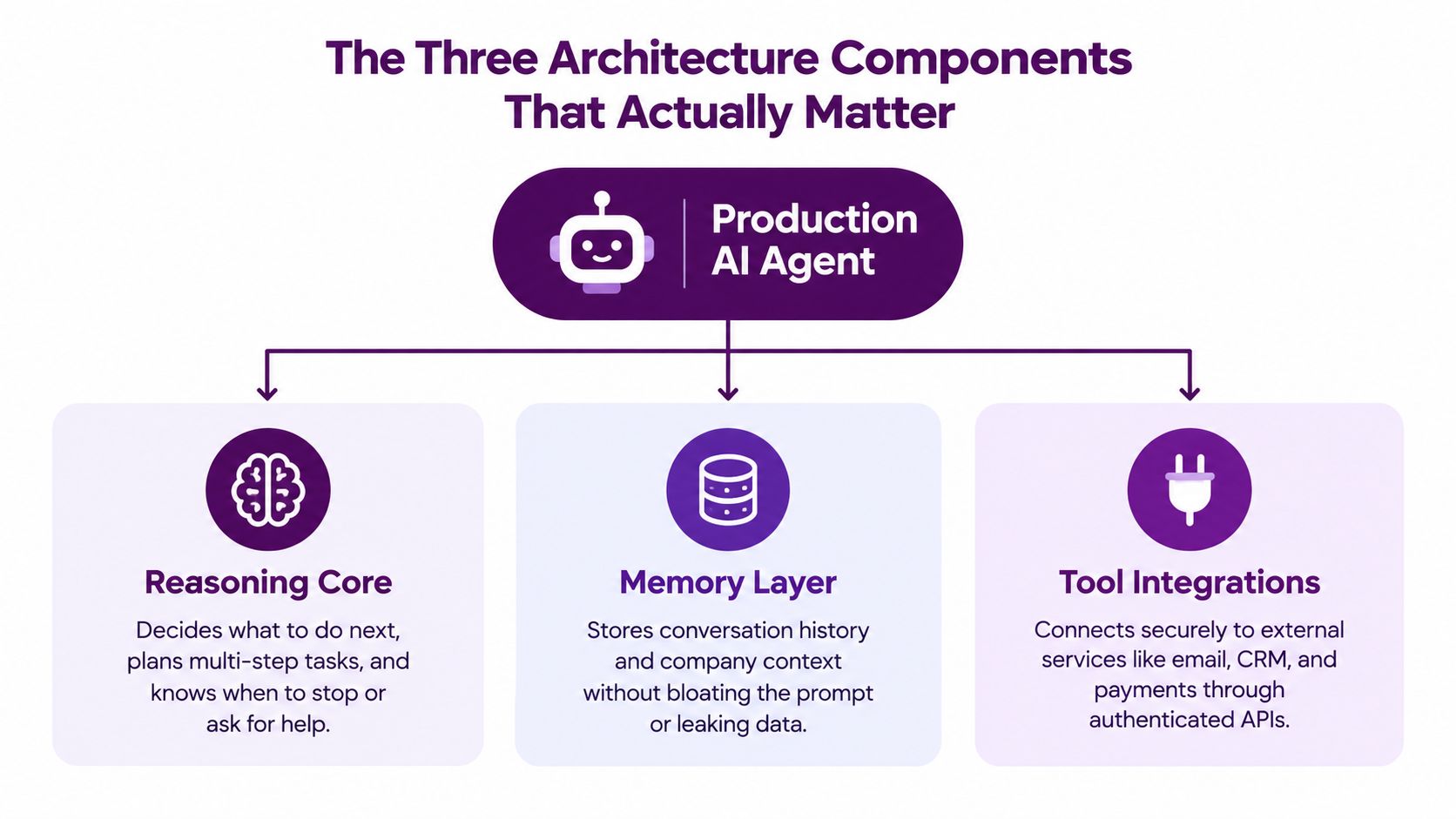
A production agent has three components that must work together. The model is part of the reasoning core, but it isn't the whole product. The architecture determines whether the agent can complete a multi-step request safely when tools disagree or the environment changes.
The reasoning core
The reasoning core turns a Slack request into an execution plan. It decides whether the task needs one lookup or several dependent actions, chooses the next tool, interprets the result, and knows when to ask for clarification.
A shallow loop works for retrieval. A deeper loop is useful when the agent must update several systems, but every extra step creates more latency and more opportunities for failure. The right design doesn't maximize autonomy. It gives the agent enough room to complete routine work and clear boundaries for actions involving money, access, deletion, or external communication.
The core should expose its state to the rest of the system. Store the current objective, completed actions, pending actions, tool results, and reason for stopping. You don't need to show every internal thought to the user, but you do need a useful execution trace for debugging and review.
The permission layer
The permission layer answers a more important question than “Can the agent call this API?” It answers, “Can this user authorize this specific action on this specific object?”
Use OAuth authorization tied to the requesting user. Pass the user identity through every tool call, enforce the provider's scopes, and refuse actions that exceed those scopes. A sales manager may be able to read a deal and update a pipeline stage, while a contractor may only be allowed to view a limited record. The agent shouldn't flatten those distinctions for convenience.
Least privilege adds friction. Users may need to connect another account or approve a write action. That friction is preferable to an agent that can reach information the requester couldn't access themselves.
The memory and skills layer
Memory gives the agent continuity, but raw conversation history is a poor substitute for a designed knowledge system. Store stable company standards, approved workflows, and preferences separately from transient task context. A proposal style can become a reusable skill. A customer's sensitive billing detail should remain scoped to the relevant task and users.
Skills should be explicit enough to inspect and change. “Sound professional” is weak guidance. “Use the approved pricing rules, include the standard renewal terms, and request human approval before offering a discount” is operational guidance that can be tested.
For a broader treatment of the choices involved in connecting agents to real products and workflows, the Agent integration playbook for product teams is a useful reference.
| Component | Primary responsibility | Common failure mode |
|---|---|---|
| Reasoning core | Plans work, selects actions, and decides when to stop | It follows a happy path and improvises when a tool fails |
| Permission layer | Enforces user identity, scopes, and approval rules | A shared credential grants access beyond the requester's authority |
| Memory and skills layer | Preserves useful context and company standards | Context grows without control or sensitive data leaks across users |
The architecture becomes easier to reason about when each component has a clear contract. The reasoning core requests an action. The permission layer checks whether that action is allowed. The tool integration executes it. The memory layer records only what the system should retain. That separation makes failures easier to locate and governance easier to enforce.
A short visual overview can help teams align before implementation. The following video is useful as a conceptual companion, but it shouldn't replace decisions about identity, data boundaries, or auditability.
<iframe width="100%" style="aspect-ratio: 16 / 9;" src="https://www.youtube.com/embed/ZaPbP9DwBOE" frameborder="0" allow="autoplay; encrypted-media" allowfullscreen></iframe>Building OAuth Integrations Across 2000 Business Tools
Connecting one API is straightforward. Operating an agent across HubSpot, Stripe, Google Drive, Linear, Notion, Salesforce, GitHub, Gmail, and legacy business systems is a governance problem disguised as an integration problem.
Start with identity. The agent should know which Slack user initiated the request, which connected accounts belong to that user, and which organization or workspace owns each resource. Don't route all requests through a broad service account unless the workflow explicitly requires it and the organization has accepted that risk.
Build the authorization path first
A practical OAuth sequence looks like this:
- Ask for the narrowest useful scopes. Separate read permissions from write permissions where the provider supports it. Don't request deletion, administration, or billing access for a reporting workflow.
- Store tokens securely. Encrypt credentials, isolate tenants, and keep provider tokens out of prompts, logs, and ordinary application records.
- Handle refresh and revocation. Expired tokens are normal. Revoked access, changed scopes, and disconnected accounts need clear states that the agent can report without exposing credential details.
- Recheck authorization at execution time. A user may have lost access between planning and action. The system should verify the current permission before each consequential write.
- Require approval for sensitive actions. Sending an external email, changing a payment record, deleting data, or modifying access should have an explicit checkpoint unless the organization has deliberately approved automation.
The central rule is that the agent can't grant itself authority. If the requester can't access a customer record, the agent can't use a different connected account to retrieve it. If the requester can read but not modify a record, the agent can draft the change and ask for approval rather than performing it.
Normalize tools behind one execution contract
Each provider has different names for similar actions. Stripe may expose payment objects, HubSpot may expose deals, and a legacy ERP may expose invoices through a custom endpoint. Your orchestration layer should give the agent consistent operations such as find_customer, get_invoice_status, create_draft, and update_record, while the connector handles provider-specific details.
Every tool definition should state:
- Inputs: Required fields, accepted formats, and validation rules.
- Access: The OAuth scopes and resource ownership required.
- Side effects: Whether the call reads, creates, updates, sends, or deletes.
- Failure behavior: What happens on timeout, duplicate request, rate limit, or partial completion.
- Evidence: The source record, timestamp, and response needed to support the result.
Custom connectors deserve the same discipline. Legacy ERPs and on-premise systems often have inconsistent schemas, limited APIs, and stricter network boundaries. Put an adapter in front of them rather than teaching the model every exception. Keep the adapter responsible for validation, retries, idempotency, and translation into the common tool contract.
For teams looking for concrete OAuth patterns, these OAuth integration examples are a useful implementation reference.
Log actions as a replayable trail
A final Slack answer isn't an audit trail. Log the initiating user, selected tools, requested scopes, inputs after redaction, outputs, approvals, errors, and final state. Give operators enough detail to reconstruct what happened without storing secrets or unnecessary personal data.
A good trail also improves the product. When a user says, “That invoice was the wrong one,” you can see whether the search matched an ambiguous name, whether the CRM returned stale data, or whether the agent ignored a policy. Without step-level records, every investigation becomes guesswork.
The hard part of learning how to create an AI agent isn't making it call many APIs. It's making every call identity-aware, permission-checked, observable, and recoverable.
Designing Memory and Skills That Scale
An agent that remembers everything becomes unsafe and difficult to control. An agent that remembers nothing forces users to repeat the same instructions and produces inconsistent work. Useful memory sits between those extremes.
Treat memory as a set of governed stores rather than one growing transcript. Separate company-wide skills, team context, personal preferences, task state, and sensitive source data. Each store needs an owner, an access policy, a retention rule, and a way to correct outdated information.

Explicit skills for stable standards
Explicit skill encoding works best for rules that should apply repeatedly. Examples include proposal structure, pricing boundaries, brand voice, expense policy, escalation paths, and approved customer language.
Write these standards as executable guidance with examples and exceptions. A pricing skill should explain which fields to inspect, which offers require approval, and what to do when records conflict. A brand skill should define the output format and forbidden claims, not just ask for a friendly tone.
The trade-off is maintenance. Explicit skills are easier to audit than implicit prompt behavior, but someone must update them when the company changes its process. That's a good trade. A visible rule can be reviewed, tested, and versioned. A behavior that emerges from a pile of old conversations can't.
Trajectory memory for recurring workflows
Trajectory memory records how a task was completed, including tool calls, observations, corrections, and the final result. It's valuable when the same workflow recurs and the agent needs to understand which intermediate steps matter.
For example, a revenue update may require matching a Stripe customer to a HubSpot company, checking the reporting period, excluding refunded transactions, and formatting the result for a leadership channel. The useful memory isn't every sentence from the previous conversation. It's the validated workflow pattern and the conditions that caused it to stop or ask for help.
Trajectory memory can also become a liability. If the agent stores an incorrect assumption as a successful pattern, it may repeat the error. Mark memories with provenance, confidence, scope, and review status. Don't let a single unverified run rewrite a company skill.
Collaborative memory across private coworkers
Teams often need private context as well as shared context. A salesperson may keep personal notes about follow-ups, while the revenue team shares definitions for pipeline stages. The system should let private coworkers collaborate without exposing every private note to every teammate.
Use explicit sharing boundaries. Share the result required for the joint task, not the entire private memory store. A personal meeting preference might be passed to a scheduling action, while unrelated personal notes remain inaccessible.
Teams evaluating persistent context can use this guide to persistent memory for agents to compare implementation patterns.
| Memory pattern | Best fit | What breaks first |
|---|---|---|
| Explicit skills | Stable policies and repeatable standards | Rules become stale or conflict with newer policy |
| Trajectory memory | Recurring multi-step workflows | An unverified outcome gets treated as a trusted pattern |
| Collaborative memory | Work shared across people or agents | Private context crosses a boundary without clear consent |
The practical design principle is remember decisions and reusable context, not everything the agent has ever seen. Provide users with ways to inspect, correct, delete, and restrict memory. That turns memory from an invisible risk into an operational feature.
Testing That Catches Failures Before Users Do
Single-run accuracy is a poor proxy for production reliability. An agent can succeed once because the data is clean, the API responds quickly, and the model happens to choose the right path. The same workflow may fail when a record is renamed, a token expires, or a tool returns an incomplete response.
Trajectory-based evaluation tests the entire execution path. Run realistic tasks repeatedly, capture the plan, tool calls, observations, memory updates, approvals, and final action, then score more than the answer. The relevant question is whether the agent behaved safely and consistently throughout the task.
Enterprise-focused benchmark work found that single-run success could fall from 60% to 25% when consistency was measured over 8 runs, and recommends tracking failure rates, cost, latency, and policy compliance alongside task completion in this trajectory evaluation research. Those numbers describe the evaluation problem, not a guaranteed production outcome. They show why one successful demo tells you very little about repeatability.
Build a failure-based test set
Source scenarios from real mistakes, support escalations, permission denials, and partial integrations. Include normal requests, ambiguous requests, malicious inputs, stale records, duplicate records, missing fields, revoked credentials, and tools that return contradictory information.
For every scenario, define an observable pass condition. “The agent handled it correctly” is too vague. A stronger rule might say that the agent must identify the ambiguity, avoid a write, request the missing field, and preserve the original user's access boundary.
Use multiple reviewers for difficult traces. If experienced people can't independently agree on whether a run passed, the rule needs refinement before it becomes an automated benchmark.
Inspect the path, not just the outcome
Instrument each transition:
- Planning: Did the agent identify the correct objective and dependencies?
- Tool selection: Did it choose an approved connector with appropriate scope?
- Input construction: Did it pass the right customer, date range, and record identifier?
- Observation handling: Did it recognize errors, stale data, and conflicting results?
- Memory updates: Did it retain only information allowed by policy?
- Final action: Did it post, update, send, or stop at the correct checkpoint?
Security testing should include prompt injection through tool results, documents, CRM notes, and email content. Teams can supplement ordinary QA with automated LLM security testing, but automated checks still need human-calibrated scenarios and review.
AgentProp-Bench evaluated 2,000 tasks and 2,300 traces across four domains. Its findings showed substring-based judging matched human annotation at kappa = 0.049, while a three-LLM ensemble reached kappa = 0.432, demonstrating that the judging method changes the apparent quality of an agent. The study also estimated that a parameter-level injection propagated to a wrong final answer with a human-calibrated probability of about 0.62, with a reported range of 0.46 to 0.73. These findings are detailed in the AgentProp-Bench evaluation.
Practical rule: Treat every tool result as untrusted input until the agent validates its source, scope, and relevance.
A useful QA program measures task completion, policy compliance, trace quality, cost, latency, and recovery behavior separately. This AI quality assurance resource can help teams organize those checks. A single pass or fail number hides where the system broke.
From Prototype to Production Rollout Plan
Roll out the agent as an operational system, not a feature flag attached to a clever prompt. Start with one workflow where the business owner can define success, inspect the source data, and review every consequential action.
Founder-led onboarding works well early because the first users can connect real accounts, expose undocumented exceptions, and decide which actions need approval. Keep the initial permission set narrow. Let the agent read and draft before allowing it to send, update, or trigger financial and customer-facing actions.
Use a staged rollout:
- Observe: The agent gathers information and proposes a plan without changing systems.
- Draft: It prepares Slack updates, CRM notes, emails, or tickets for human approval.
- Act within bounds: It performs low-risk, reversible actions with a complete audit record.
- Expand carefully: Add tools, teams, and write permissions only after recurring traces meet the organization's acceptance rules.
Assign an owner for skills, integrations, incident review, and access policy. Monitor failed tool calls, repeated clarification requests, permission denials, unusual action sequences, and user corrections. Those signals reveal where the workflow needs better data or a clearer rule.
PwC's survey highlights that few businesses are connecting agents across workflows and functions, even though cross-functional orchestration is where much of the operational value sits. The PwC survey on AI agents reinforces the need to design the operating model, not just the individual agent.
Cloudera's 2025 enterprise survey identified data privacy at 53%, legacy system integration at 40%, and implementation cost at 39% as leading barriers, as reported in its enterprise AI agent findings. Address those constraints before scaling the surface area. A trustworthy agent earns broader autonomy through evidence, not enthusiasm.
Supercenter provides AI coworkers that live in Slack and Microsoft Teams, respond to mentions, and execute work across connected business tools using OAuth, with memory, skills, schedules, and auditability built into the operating model. If you're ready to move beyond a Slack demo, visit Supercenter and evaluate how your first governed workflow could run on real company data.
- AI agent
- Slack integration
- AI coworker
- business automation
- how to create an ai agent