Blogfield notes
Audit Logging Software: A Practical Buyer's Guide
You usually discover your audit logging problem at the worst possible moment. An auditor asks who changed a billing setting months ago. A customer wants proof that nobody exported their data. A Slack connected workflow updates records across three systems and nobody can explain w
You usually discover your audit logging problem at the worst possible moment.
An auditor asks who changed a billing setting months ago. A customer wants proof that nobody exported their data. A Slack-connected workflow updates records across three systems and nobody can explain whether a person approved it, an agent decided it, or a token got abused. At that point, “we have logs” stops being comforting.
Many teams think they're covered because every app spits out events somewhere. Then they try to answer one simple question under pressure and realize the trail is fragmented, the timestamps don't line up, the actor is just a service account, and the one export they need is trapped in a UI built for browsing, not evidence. That's when they learn the difference between logs that exist and logs that hold up.
Audit logging software came out of old system audit trails that recorded who did what, when, and where. That basic model still runs modern platforms. Independent guidance still defines audit logs as chronological records of security-relevant actions used to reconstruct events, investigate incidents, and prove accountability, which is exactly why they became a real software category as cloud systems spread and security teams needed searchable records across distributed tools (CyberDefenders on audit logs).
The mistake I see most often is treating audit logging like a retention problem. Keep enough data long enough, check the compliance box, move on. That's backwards. The question is whether your team can replay what happened when the incident is active, the customer is angry, or legal wants an answer that afternoon.
Table of Contents
- The Audit Logging Problem Most Teams Discover Too Late
- What Audit Logging Software Actually Does
- The Features That Separate Real Audit Logging Software from Log Viewers
- Built-In App Logs vs SIEM vs Dedicated Audit Tools
- Audit Logging for AI Agents and Cross-Tool Automation
- Enterprise Essentials for Modern Audit Logging
- Choosing the Right Audit Logging Setup for Your Team
- A First-30-Days Rollout Checklist for Audit Logging
The Audit Logging Problem Most Teams Discover Too Late
At 6:40 p.m. on a Friday, a 40-person SaaS company gets a customer escalation. Records changed across Salesforce, the app database, and a support tool over a 12-minute window. The API calls are there. The app logs are there. The service account is there. What's missing is the answer everyone needs: who kicked this off, what approved it, and the exact sequence of changes.
That is usually when a company learns it does not have an audit trail. It has fragments.
The problem is not log volume or retention policy. The problem is whether you can reconstruct a single action path under pressure. If your logs cannot show the initiating actor, the approval step, the downstream systems touched, and the before-and-after state, they will fail you during an incident even if you kept them for years.
Why existing logs fail when you actually need them
Debug logs answer engineering questions. Incident logs need to answer accountability questions.
That gap gets expensive fast. Security needs to know whether an admin changed permissions or an agent followed a bad instruction. Support needs to explain the blast radius to a customer. Legal needs an export that reads like evidence, not a pile of timestamps and request IDs.
The common failures are predictable:
- Actor context stops at the service account: You can see the API key, bot user, or workflow runner, but not the human, agent, or policy decision behind it.
- Chronology breaks across systems: Events arrive late, clocks differ, and the sequence cannot be replayed cleanly.
- Event detail is too thin: You know an object changed, but not the previous value, affected fields, approval path, or linked action in another system.
- Retrieval was never tested: Data exists, but search, export, filtering, and review fall apart the first time someone needs evidence fast.
One recent guide points to “write-only storage habits” and “incomplete event granularity” as recurring failures. It makes the right point. Stored logs are not automatically useful logs (Vson on audit logging software).
Use one blunt test. Hand an investigator a customer ID, a time window, and one suspicious action. If they cannot replay the full sequence from initiator to outcome without guesswork, your setup is not ready.
What actually triggers the purchase
The purchase usually starts after a painful question lands on the wrong day:
- An audit or enterprise prospect asks for proof of who changed what
- A token, admin action, or automation run cannot be reconstructed
- An AI agent or workflow takes an action nobody can explain end to end
Buying after that point is normal. It is also avoidable.
Choose audit logging software before the incident, and judge it by one standard: can it reconstruct the decision path clearly enough that another person can replay what happened from the record alone? That standard matters more than a long retention setting and more than a clean compliance checkbox.
What Audit Logging Software Actually Does
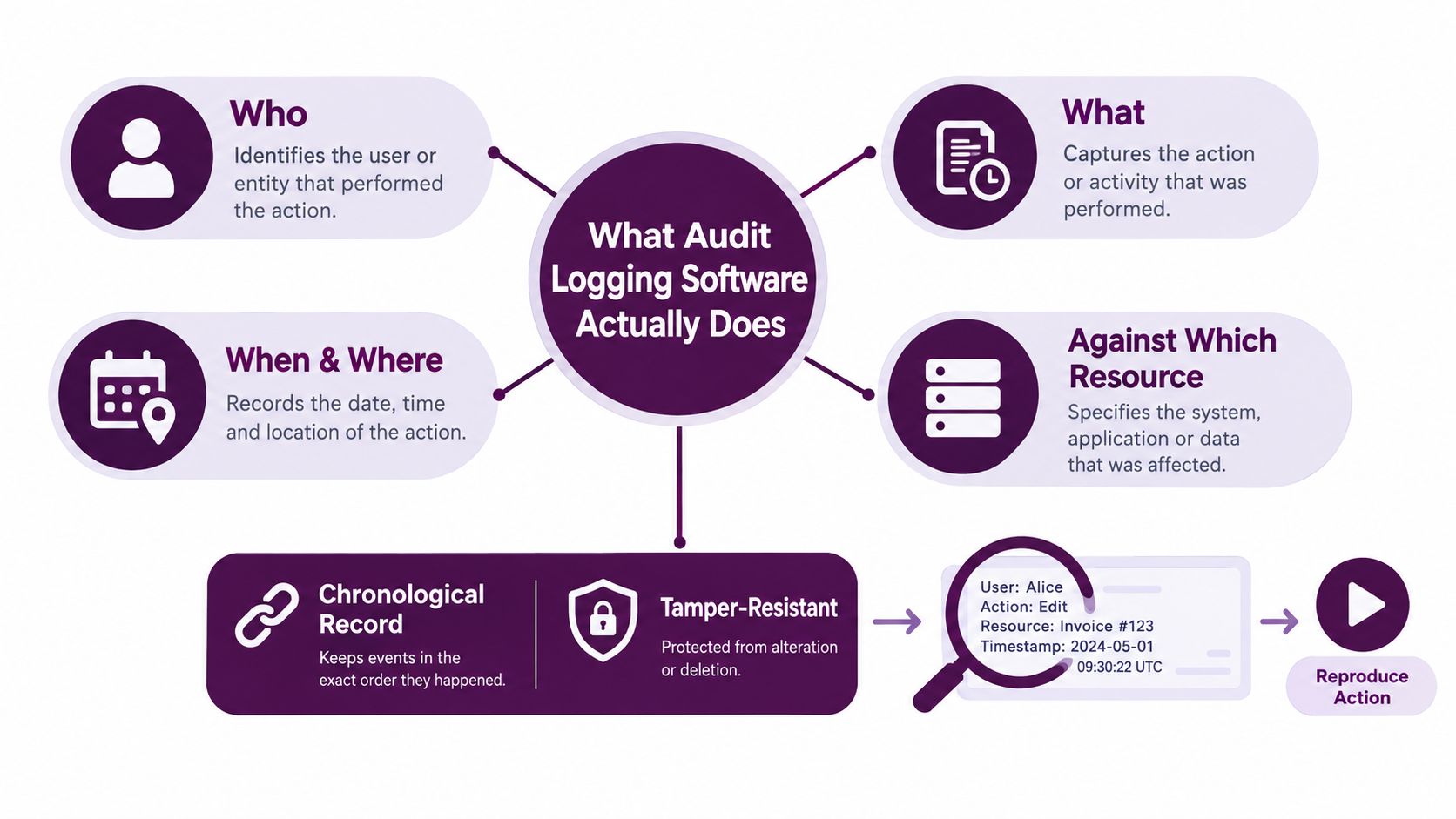
Audit logging software is the system that records who did what, when, where, and against which resource in a chronological, controlled, evidentiary format. That sounds obvious, but most products blur the line between “activity feed” and actual audit trail.
Audit logs are not the same as application logs
Application logs help engineers answer questions like “why did this request fail?” Audit logs answer questions like “who approved this action and what exactly changed?”
That difference affects everything:
- Schema: Audit events use stable, typed fields instead of free-form debug text.
- Access control: Fewer people should be able to change or delete audit records.
- Retention intent: These records are kept for accountability, forensics, and audits, not short-term troubleshooting.
- Exportability: You need evidence-grade export, not just a search box.
Google Cloud's documentation reflects how structured this has become by separating Admin Activity and Data Access audit logs into distinct categories. That split shows how audit logging evolved from generic system records into formal security and compliance infrastructure.
What a useful event looks like
A decent audit event should tell you, at minimum:
- Actor: human user, service account, bot, or agent
- Action: create, read, update, delete, permission change, export, login, token grant
- Target: record, file, customer object, workspace, integration, policy
- Time: precise timestamp with consistent normalization
- Origin: source app, session, IP context, device, or API client
- Correlation: request ID, trace ID, workflow ID, or job ID
- Outcome: success, denied, partial failure, retried
If you want a concrete API example of how a product exposes this kind of data, BroLabel's embedded audit logs guide is useful because it shows the practical shape of an audit log interface rather than hand-wavy compliance language.
Good audit logging software acts as a system of record for accountability. It is not just an observability add-on with a nicer dashboard.
Why the category keeps growing
This isn't a niche budget line anymore. One market report values the global log management market at USD 2.9 billion in 2024 and projects USD 5.85 billion by 2030, a 12.4% CAGR. Another estimates the global log audit market at USD 1.19 billion in 2025 with 6.51% CAGR through its forecast window (HR Cloud glossary reference).
Buyers don't spend on this because it's fashionable. They spend because cloud sprawl, compliance pressure, and cross-system accountability made it mandatory.
The Features That Separate Real Audit Logging Software from Log Viewers
A lot of products call themselves audit tools when they're really just searchable event buckets. That's fine for diagnostics. It's weak for incidents, legal review, or customer-facing evidence requests.
The comparison that matters
| Evaluation Criteria: Real Audit Logging Software vs Log Viewers | Real Audit Logging Software | Generic Log Viewer |
|---|---|---|
| Primary purpose | Accountability, forensics, compliance evidence | Debugging and operational troubleshooting |
| Event schema | Typed, stable, documented fields | Mixed formats, often inconsistent |
| Replayability | Reconstructs action sequence across systems | Shows raw events without reliable narrative |
| Actor attribution | Tracks user, service, delegated actor, and context | Often stops at app user or token |
| Tamper evidence | Designed to show alteration or deletion attempts | Usually assumes trust in storage layer |
| Retention controls | Policy-based by event class and evidence need | Broad retention with fewer evidence controls |
| Export quality | Built for review, investigation, and audit handoff | Built for search and ad hoc analysis |
| Cross-service correlation | Trace IDs and event relationships are first-class | Correlation is possible but often manual |
Four features I wouldn't compromise on
Replayable trails
This is the big one. Can the tool reconstruct a sequence of related actions in order, including downstream API calls and side effects? If the answer is “sort of, if an analyst writes custom queries,” keep looking.
For modern SaaS, the useful unit isn't a single event. It's the chain. User request, authorization, agent or workflow decision, tool call, target change, notification, rollback. If you can't see that chain, you won't explain the incident.
Tamper evidence
Logs have no value if privileged users can alter them.
I want append-only behavior, immutable archival options, signed or verifiable export, and clear evidence if records were changed or deleted. That architecture matters more than the dashboard. A recent evaluation of tamper-evident logging systems reported Nitro delivering about 10× to 25× higher performance on stress-test benchmarks and 2× to 10× higher performance on real-world workloads versus prior state-of-the-art systems while preserving tamper-evident properties (Nitro evaluation on arXiv).
That result matters because teams often assume integrity guarantees have to be painfully slow. They don't.
Retention tiers
Real buyers need tiered storage because not every event deserves the same retrieval speed. Practical guidance commonly recommends hot, warm, and cold retention tiers. It also cites 12 months total with the most recent 3 months immediately available for PCI DSS, about 6 years for HIPAA-aligned documentation, and about 7 years for SOX-related records (CyberAlamo retention guide).
That means your software should support policy-based retention, indexed search windows, and immutable archive export. If a vendor only talks about “long retention,” that's not enough.
Schema quality
Bad schema kills investigations. I want stable enums, documented field names, clear event versions, and correlation IDs across services. I also want sensitive fields masked in a way that preserves forensic value instead of replacing half the event with useless redaction.
The fastest way to spot a fake audit product is to ask for three exported events from three different systems. If the field names drift all over the place, the tool is lipstick on a log viewer.
Small details that become major during incidents
Clock skew handling, deduplication logic, and export formats sound boring until you're deep in a timeline review. Then they become the whole game. If the product can't normalize time and preserve ordering confidence, your investigators will spend hours arguing with the data instead of using it.
Built-In App Logs vs SIEM vs Dedicated Audit Tools
There are three common ways teams try to solve this. None is universally right. Most companies get in trouble by forcing one approach to do all jobs.
Side-by-side trade-offs
| Built-In App Logs vs SIEM vs Dedicated Audit Tools | Built-In App Logs | SIEM / Log Platform | Dedicated Audit Tool |
|---|---|---|---|
| Setup effort | Low | High | Medium |
| Cross-system visibility | Limited | Strong if configured well | Good for supported systems |
| Evidence quality | Often uneven | Depends on normalization and pipeline quality | Usually stronger by design |
| Detection and alerting | Basic | Strong | Moderate |
| Replayability | Weak | Possible but often manual | Usually a core feature |
| Query complexity | Low to moderate | High | Low to moderate |
| Best for | Small teams, single-app questions | Security operations and broad telemetry correlation | Accountability, compliance, and user-action investigations |
| Common failure | Missing context outside the app | Expensive complexity and analyst dependence | Narrower coverage if integrations are shallow |
Built-in app logs are fine until they aren't
Native app logs are convenient because they already exist. They're often enough for small teams early on. The problem is that every app defines events differently, stores them differently, and exposes them differently.
You also inherit the vendor's decisions around retention, export, actor detail, and field consistency. If your workflow crosses Slack, Salesforce, HubSpot, Google Workspace, and your own app, native logs answer only fragments of the story.
SIEMs are powerful, but they're not magic
Splunk, Datadog, Elastic, and similar platforms are great at correlation, detection, and broad telemetry centralization. If you need infra visibility, threat hunting, and custom analytics, you probably need one.
But a SIEM is not a shortcut to usable audit evidence. It takes heavy normalization, parser work, retention planning, and people who know how to ask the right questions. Many teams ingest everything, celebrate the centralization, and then discover that their “audit trail” still depends on custom searches and tribal knowledge.
A SIEM can contain your audit data. That doesn't make it an audit system.
Dedicated audit tools sit in the middle
Dedicated audit tools are built around evidence questions. Who changed what. Which authorization allowed it. Which systems were touched. Can I export this cleanly for review.
That's why they tend to win for internal investigations and compliance workflows. They usually trade some breadth for depth. That's a fair trade if your pain is accountability, not generalized telemetry.
For AI-heavy SaaS, I'd usually choose one of two setups:
- SIEM plus a dedicated audit layer if you have real security operations needs
- Dedicated audit tool plus native exports if the main problem is proving and replaying actions
If your product includes agent workflows in Slack or Teams, ask whether the tool can represent on-behalf-of actions cleanly. For example, one option in this category is Supercenter, which states that actions happen on behalf of users and are logged in a full, replayable audit trail. That's the kind of product behavior to look for when evaluating agent-heavy environments.
Audit Logging for AI Agents and Cross-Tool Automation
Traditional audit models assume a human clicked a button inside one app. That assumption breaks fast once AI agents and automations start doing work across tools.
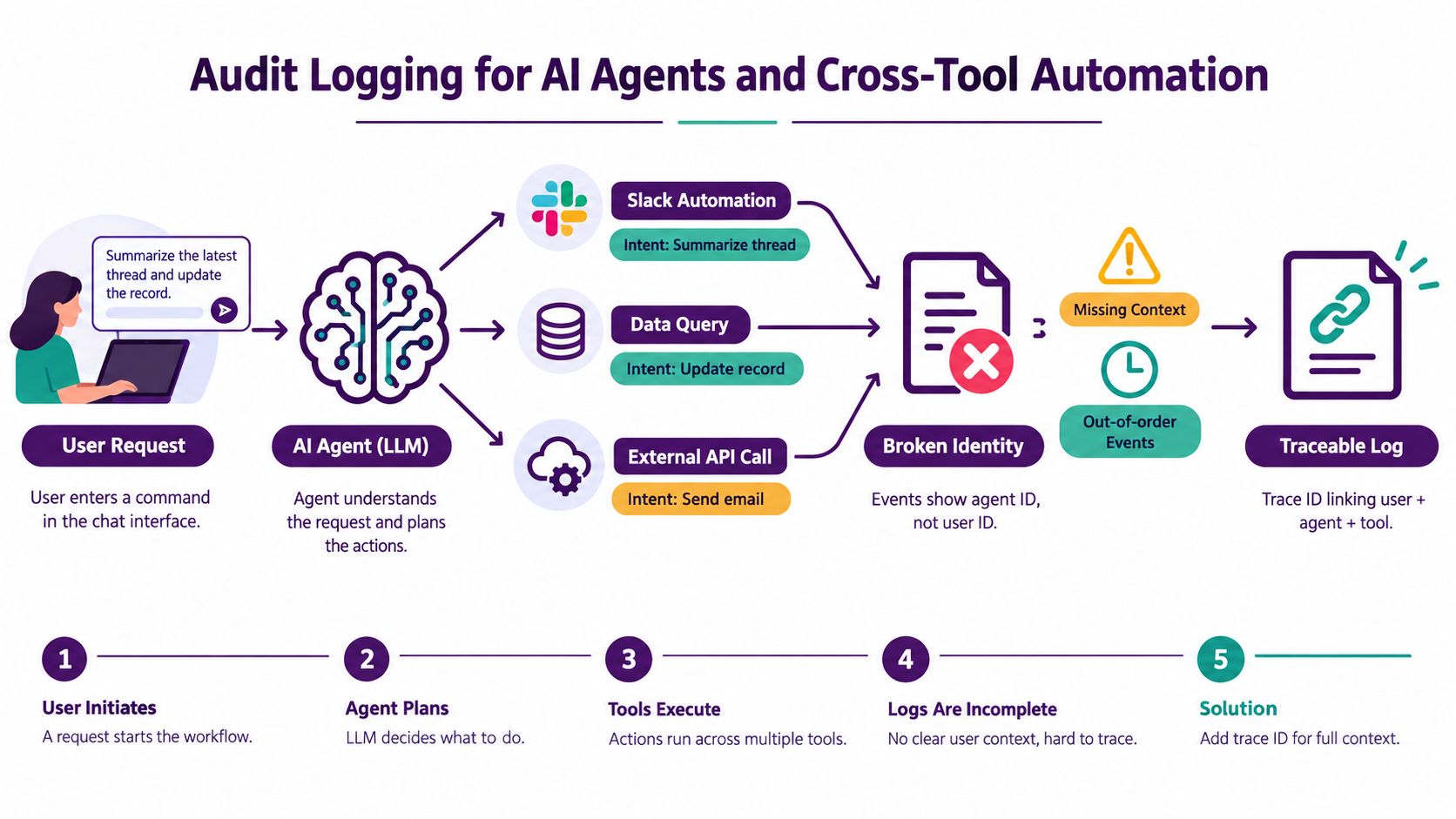
A Slack message triggers an agent. The agent looks up context, decides which tool to use, invokes an OAuth-backed action, updates a record, and posts the result. If your logs only capture the final API write, you've lost the important part of the story.
What changes with agent activity
You now need to capture more than user identity and endpoint calls. You need:
- Delegation authority: who authorized the agent to act
- Action chain: which steps happened in sequence
- Tool provenance: which connected app executed each side effect
- Scope boundaries: what the agent could access versus what it touched
Recent research frames the gap clearly. Native logs often capture sessions and API calls, but miss the human authorization chain, tool-call detail, and provenance needed to prove an agent acted within scope. The core issue isn't “we need more logs.” It's that teams need context-rich logs that preserve delegation, scope, and tool-level actions (Stingrai on the AI agent audit evidence gap).
A related practical reference is this piece on audit trail and logging, which is useful if you're mapping traditional audit concepts onto agent-driven operations.
The identity problem is worse than people think
Many systems record the acting principal as the bot, service account, or integration token. That's technically accurate and operationally useless. Investigators need to know which human request or approved policy led to that chain of actions.
Here's the failure mode: your trail says “agent updated CRM record.” Fine. Which user asked for it? Which permissions were in play? What intermediate retrieval happened? Was the action retried? Did the same trace also touch another system? Without that linkage, your audit trail collapses exactly where automation risk starts.
A short explainer helps more than another paragraph:
<iframe width="100%" style="aspect-ratio: 16 / 9;" src="https://www.youtube.com/embed/7dyHu4ax7n8" frameborder="0" allow="autoplay; encrypted-media" allowfullscreen></iframe>Replayability matters even more here
With human actions, reviewers can often infer intent from a UI path. With agents, they can't. You need a deterministic chain that lets your team replay the sequence and understand what happened without trusting a summary generated after the fact.
That means your audit logging software should model the session as a linked transaction, not a bag of events.
Enterprise Essentials for Modern Audit Logging
Enterprise buyers should stop asking whether a vendor “has audit logs” and start asking whether the logs survive legal, regulatory, and incident pressure.
What to verify in vendor calls
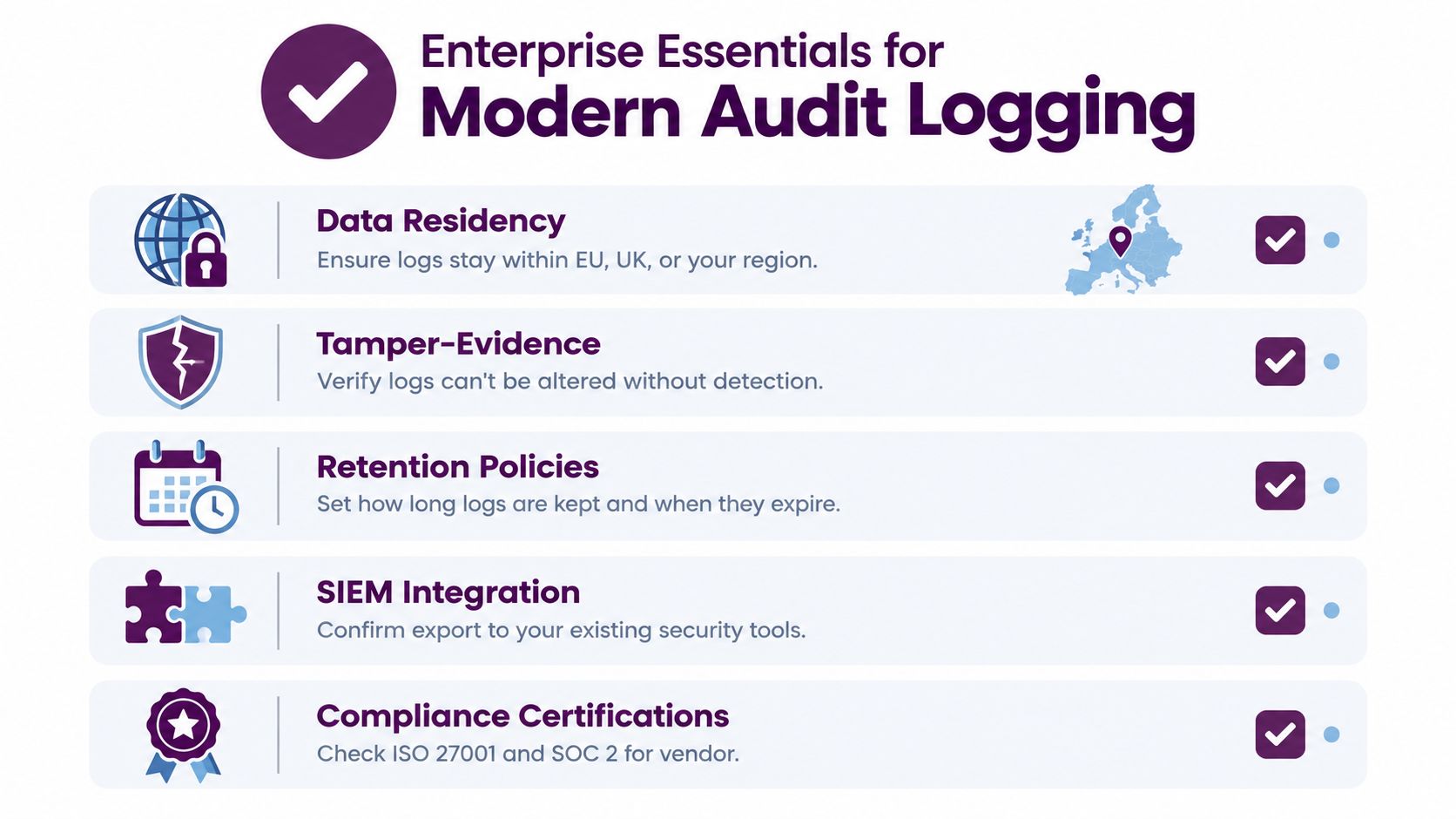
Data residency and key control
If you operate in regulated environments, location matters. Ask where logs are stored, whether regional residency options exist for EU and UK operations, and how backups are handled. Then ask who controls encryption keys and whether customer-managed key options exist.
A vendor that gives a polished answer on app features but gets fuzzy on log residency is telling you where their priorities are.
Replayable trails across systems
This should be baseline, not premium. You need chronological reconstruction across user actions, admin actions, integrations, and delegated workflows. If the vendor can only show isolated event pages, they're giving you records, not a trail.
Collaboration-surface depth
A lot of work now starts in Slack or Teams. That means your audit tooling should capture not just API outcomes, but the collaboration context that initiated them. Message-triggered actions, approvals, escalations, and delegated instructions all matter.
Many “enterprise-ready” products fall apart. They integrate with the app API, but not the human workflow that wraps the action.
The checklist I'd actually use
- SSO and SCIM support: Identity drift ruins audit quality fast.
- Granular RBAC: Audit reviewers, compliance staff, and engineers shouldn't all have the same access.
- Evidence-friendly exports: Legal and compliance teams need clean, portable output.
- Retention by data class: Different events deserve different policy treatment.
- SIEM interoperability: Your audit system shouldn't become another silo.
If you want a practical companion checklist, this guide on audit trail best practices is worth reviewing before procurement calls.
Buy for the investigation you'll have, not the demo you saw.
Questions that flush out weak vendors
Ask them to walk through a delegated action from start to finish. Not a screenshot. A real sequence.
Ask:
- Who initiated it?
- What scope authorized it?
- Which systems were touched?
- How do you prove order?
- How do you prove the export wasn't altered?
- What happens if a privileged admin tries to weaken logging?
Weak vendors answer with feature names. Strong vendors answer with event flows.
Choosing the Right Audit Logging Setup for Your Team
The right setup depends less on company size than on risk shape. A tiny team with heavy automation may need better audit trails than a larger team running mostly manual workflows.
A simple decision table
| Solution Type by Team Profile | Recommended Setup | Key Signal |
|---|---|---|
| Early-stage SaaS with one core app and limited integrations | Built-in logs plus lightweight structured event stream | Mostly human actions, low audit pressure |
| Growing company facing SOC 2, ISO-style reviews, or customer security questionnaires | Dedicated audit tool layered over core systems | Repeated who-did-what questions from buyers and auditors |
| Ops-heavy company using Slack workflows and many SaaS integrations | Dedicated audit tool with strong cross-app correlation | Actions regularly span multiple tools |
| Security-mature org with incident response capability | SIEM plus dedicated audit layer | Need both threat detection and evidence-grade reconstruction |
| AI-agent-heavy environment with delegated actions | Replayable audit platform with agent context, plus central export | Need to prove user authorization across tool chains |
My blunt recommendation
If your environment includes AI coworkers, service accounts, delegated OAuth access, or Slack-native operations, don't rely on built-in app logs alone. You'll outgrow them the first time someone asks for end-to-end attribution.
If you're still early but know automation is increasing, plan your identity and access model now. This becomes even more important once you're dealing with machine actors and permission boundaries, which is why this piece on AI access control is relevant to audit design, not just authorization design.
Don't buy the broadest tool. Buy the clearest trail.
Feature lists are noisy. Vendor categories are noisy. Your buying question should stay simple: when something goes wrong, which product will let my team reconstruct the truth fastest and defend that answer confidently?
That's the tool worth paying for.
A First-30-Days Rollout Checklist for Audit Logging
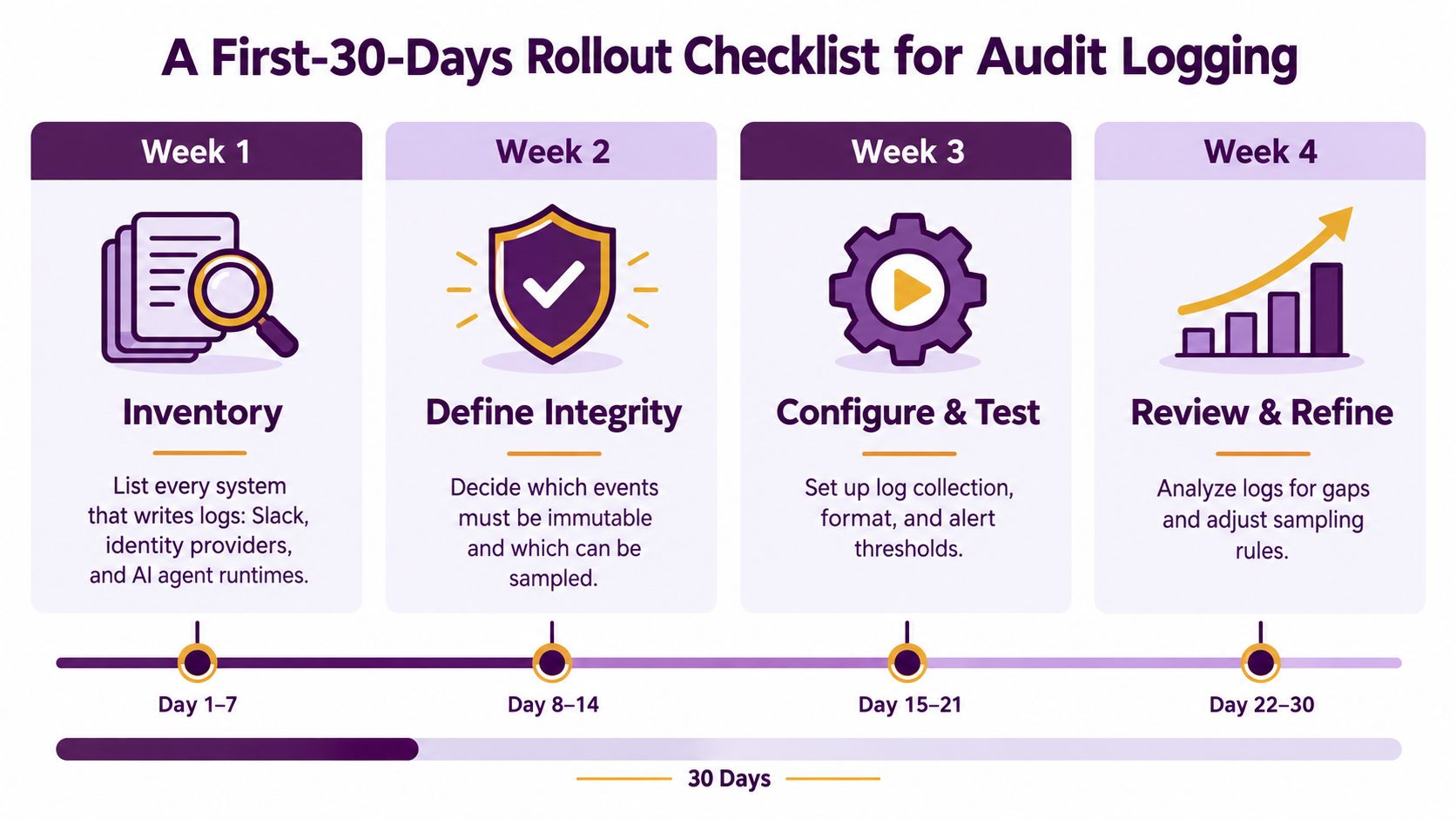
The first month matters because bad event design gets expensive fast. Don't start by hoarding data. Start by deciding what must be trustworthy.
The rollout order I'd use
- Inventory every logging surface. Include your app, identity provider, Slack, Teams, admin consoles, data stores, background jobs, and agent runtimes.
- Classify critical events. Decide which actions must be immutable and which can tolerate lower fidelity.
- Standardize event fields. Get actor, target, action, timestamp, correlation ID, and authorization context into every important record.
- Lock down access. Route review through SSO, role controls, and approval paths for export or deletion.
- Set retention by event class. Don't apply one flat policy to everything.
- Test retrieval under pressure. Run a tabletop exercise using only the audit trail.
- Patch blind spots immediately. The gaps you find in drills are the same gaps attackers and auditors will find later.
Pitfalls to avoid
- Don't log first and model later. You'll create noisy evidence that nobody trusts.
- Don't skip export testing. The UI is not your audit plan.
- Don't treat automation as a side case. It will become the hard case.
Your first successful audit log rollout is not when ingestion turns green. It's when your team can replay a mock incident without leaving the trail.
Then put a quarterly review on the calendar. Systems change. Integrations drift. New agents appear. If the trail no longer reflects how work happens, it's already decaying.
Supercenter gives teams AI coworkers inside Slack that act across connected tools with on-behalf-of permissions and a full, replayable audit trail, which makes it directly relevant if your audit problem starts where human requests turn into multi-tool actions. If you're evaluating how to keep agent activity accountable without slowing down operations, visit Supercenter.
- audit logging software
- compliance logging
- SIEM tools
- security audit trail
- log management