Blogfield notes
10 AI Governance Best Practices for AI Coworkers
An AI coworker can start with a simple Slack request and end up changing the business. A revenue leader might ask Frida to pull Stripe figures, update a HubSpot deal, check a Google Drive proposal, and brief the sales team in the same thread. That workflow touches identity, finan
An AI coworker can start with a simple Slack request and end up changing the business. A revenue leader might ask Frida to pull Stripe figures, update a HubSpot deal, check a Google Drive proposal, and brief the sales team in the same thread. That workflow touches identity, financial data, model choice, storage location, external actions, and human accountability at once.
That's why AI governance best practices for AI coworkers must go beyond acceptable-use policies. Security teams need to control permissions and data movement. IT teams need reliable connectors, logs, monitoring, and rollback paths. Leadership needs a clear answer to a basic question: who owns the outcome when an AI system acts across several business tools?
The ten practices below turn governance into working controls. Supercenter is a relevant example because its coworkers live inside Slack, operate across connected tools, retain company skills, and act within the permissions of the user who invokes them. The same principles apply whether your team is assessing Supercenter or building its own agentic workflow. For a related perspective on compliance responsibilities, see this guide to AI Act compliance in HR.
Table of Contents
- 1. Role-Based Access Control and Permission Scoping
- 2. Comprehensive Audit Logging and Action Replay
- 3. Model Selection, Configuration, and Budget Controls
- 4. Data Residency and Sovereignty Controls
- 5. Skills and Knowledge Management Governance
- 6. Integration and Connector Security Governance
- 7. Incident Response and Breach Containment Procedures
- 8. User and Team Onboarding Governance
- 9. Change Management and Impact Assessment
- 10. Proactive Monitoring, Anomaly Detection, and Governance Alerting
- AI Governance: 10 Best Practices Comparison
- Turn Governance Into a Working Operating System
1. Role-Based Access Control and Permission Scoping
An AI coworker should never receive a broader identity than the person asking it to work. The safest operating model is delegated execution, where the coworker acts on behalf of the invoking user and inherits only the permissions that user already has.
That boundary matters because a request often crosses systems with different security models. A sales manager might be allowed to update selected HubSpot pipelines but not view every account. A finance employee might access a restricted Google Drive folder but not another department's compensation files. A user could have access to one Stripe account while remaining blocked from others.
Supercenter's model follows this pattern. Frida can respect the user's permissions when she works in HubSpot, Google Drive, Stripe, or a custom business system. For an implementation reference, document the principles in this guide to AI access control.
Map permissions before enabling actions
Treat every connector as a security integration, not a convenience feature. During setup, map the tool's native roles, scopes, folder permissions, row-level restrictions, and account boundaries to your internal access model.
Use a restricted test account before allowing production actions. Ask it to retrieve data it should not see, update records outside its role, and invoke a connector the user shouldn't access. A failed authorization should remain visible in logs, not disappear as a generic coworker error.
Practical rule: If a user can't perform an action manually, the AI coworker shouldn't be able to perform it through delegation.
Review OAuth scopes as part of regular access governance, and revoke or resynchronize grants when a person changes role or leaves the organization. Avoid shared service accounts unless there's a documented reason and compensating control. Shared identities make accountability weaker because the audit trail no longer connects an action to the person who requested it.
2. Comprehensive Audit Logging and Action Replay
A governance program needs more than a record that “Frida ran.” It needs enough context to reconstruct what happened. That means recording the requesting user, the task, the tools called, the relevant data access, the resulting changes, timestamps, approvals, failures, and the final response.
Consider a morning briefing. A useful record shows which sources were queried, what filters were applied, which metrics were included, and who received the result. For a HubSpot update, it should show the deal fields requested, the API response, and whether the write succeeded. For an unsuccessful task, the failed permission check matters just as much as a successful update.
Supercenter describes this as a full, replayable audit trail. Its relevance is practical: a reviewer can examine how a coworker reached an outcome instead of relying on a generated explanation after the fact. These principles also apply to a broader audit trail for AI actions.
Log decisions and changes at the right level
Logging every low-level event can create noise, cost, and privacy exposure. Logging too little leaves investigators unable to answer basic questions. Capture the events that explain a decision and a change, including the user context, tool call, data object, result, approval state, and error condition.
Use structured records so security teams can search them and send relevant events to a SIEM. Protect the logs themselves with encryption, retention rules, and role-based access. Someone investigating a coworker shouldn't automatically gain access to the sensitive customer data that coworker handled.
Action replay is especially valuable for irreversible or consequential work. If an AI coworker sent a message, changed a CRM record, or created a financial workflow, reviewers should be able to inspect the sequence and determine whether to reverse the change, improve the skill, or tighten the permission boundary.
3. Model Selection, Configuration, and Budget Controls
An AI coworker that updates a CRM, routes a support case, or prepares a deal brief needs a model chosen for the work it can perform, not for brand recognition. Model selection affects reasoning quality, response time, privacy treatment, operating cost, and the reliability of actions across connected tools.
Supercenter lets organizations choose models such as Claude, GPT, Mistral, and open-weight options. That flexibility requires a decision record for each workflow. Document the intended outcome, permitted data, processing location, identity and tool permissions, expected output format, and fallback behavior if the model becomes unavailable or changes performance. Leadership should approve the risk and cost boundary, while security and IT verify that the configuration matches it.
Tie model choice to the task
Start with the business outcome. A sales coworker may need strong reasoning and reliable structured output to update records safely. A repetitive support coworker may favor predictable cost and response speed. An exploratory marketing workflow may use another model with stricter data and execution limits.
Set token or usage budgets for each team and workflow, with exceptions routed to an owner. A budget also acts as an operational signal. An unexpected increase may indicate a looping workflow, oversized prompts, connector failure, or attempted misuse. Define limits for both model calls and downstream actions so a faulty coworker cannot create uncontrolled changes.
Measure consumption against useful outcomes, such as completed records, resolved requests, or approved briefings. Test models on representative company terminology, policies, and data instead of relying on published benchmarks. Record the results, review quality and failure modes, and repeat testing after meaningful configuration changes.
The NIST AI Risk Management Framework provides a useful lens. Its Govern, Map, Measure, and Manage functions turn procurement into an ongoing process for assigning accountability, evaluating risk, and adjusting controls.
4. Data Residency and Sovereignty Controls
An AI coworker moves data between places even when the user sees only one Slack thread. A prompt may contain customer details, the model may process that prompt in a particular region, the output may be stored in a workspace, and the connected tool may retain a new record. Governance has to account for the entire path.
Supercenter describes EU data residency as the default and provides regional controls through its privacy and processing documentation. That gives security and procurement teams a starting point, but the organization still needs to record what data crosses which boundary and under what agreement. Use this data residency explanation when preparing internal reviews.
Document the data path
Create a data-flow record for every high-value coworker. It should identify the source system, prompt content, model endpoint, output destination, log location, retention behavior, and deletion process. Include failover behavior. A regional outage must not send restricted data to an unapproved location merely because a backup route exists.
Keep onboarding clear. Let customers and internal teams understand which region applies, what data the coworker can access, and how records are removed. Deletion should produce an auditable event, especially when prompts, outputs, and logs may contain personal or confidential information.
Residency is also a contract and vendor-management question. Make the selected region visible in security documentation and customer agreements, then review changes when a model provider, connector, storage layer, or legal requirement changes. Teams handling automated decisions should also examine relevant guidance on automated decisions under the Privacy Act, particularly when a coworker's output influences a person's treatment.
5. Skills and Knowledge Management Governance
An AI coworker becomes useful when it understands how a company works, but retained knowledge can become a governance risk if nobody owns it. A pricing rule, expense policy, proposal format, or brand voice should be treated as a controlled business asset, not an informal instruction that lives forever in a prompt.
Supercenter's reusable skills illustrate the operating model. A finance team can encode an expense policy, a sales team can maintain proposal standards, and a brand team can define communication rules that travel across connected tools. The benefit is consistency. The risk is that an outdated skill can spread an outdated rule quickly.
Give every skill an owner and version
Assign a named business owner to each important skill. That owner should approve changes, resolve conflicts, and confirm when the skill still reflects the policy. Legal should own contract language, finance should own expense rules, and the commercial team should not alter a discount policy without the appropriate approval.
Version skills and attach the active version to outputs and actions. If a deal was logged under one pricing rule and a proposal was generated under another, reviewers need to know why. A version record also makes rollback possible when a change produces confusing or unsafe results.
Conflicts need explicit handling. A sales skill may encourage a discount while a finance skill restricts one. Define which rule has priority and when the coworker must stop and request approval. Review high-impact skills on a fixed cadence and after policy changes. The aim isn't to freeze company knowledge. It's to make change deliberate, traceable, and reversible.
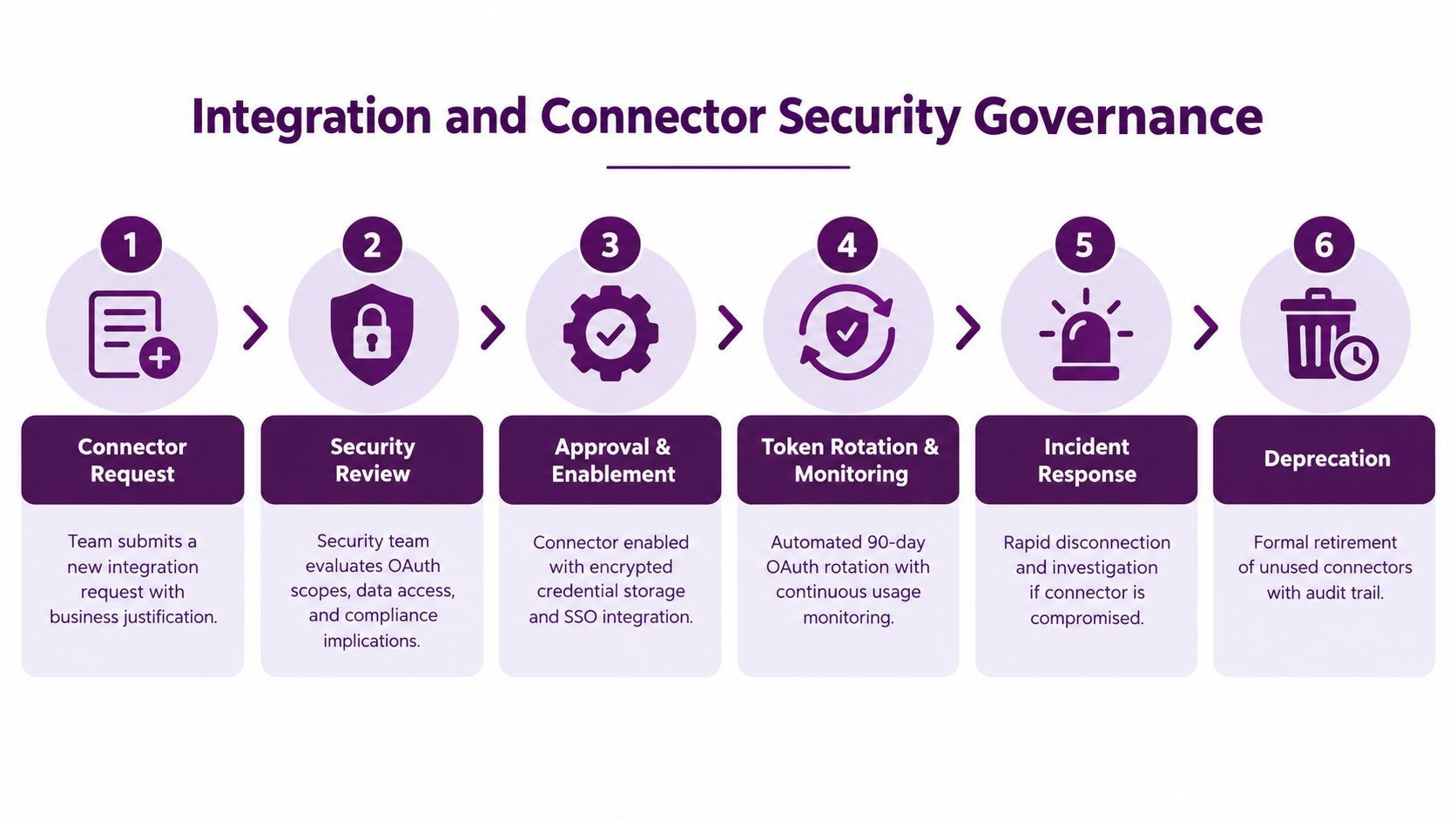
6. Integration and Connector Security Governance
The connector is where an AI coworker stops being a text generator and starts becoming an operator. Slack may be the interface, but the security surface includes HubSpot, Stripe, Google Drive, Salesforce, GitHub, Linear, Gmail, ERP systems, and custom on-premise applications.
Supercenter supports more than 2,000 connected business tools, including custom connectors for legacy and enterprise systems. That breadth can remove manual work, but it also means every integration deserves an inventory entry, an owner, a permission review, and a retirement plan.
Review connectors as production software
Before activation, document what the connector can read, write, delete, or trigger. Record its OAuth scopes, token handling, data classification, vendor dependencies, and failure behavior. Security should review new integrations, while the system owner confirms that the workflow has a legitimate business purpose.
Protect credentials in transit and at rest, and revoke them promptly when a relationship or role ends. Monitor usage for unexpected patterns, such as a connector suddenly reading far more records than its normal workflow requires. A connector that sits unused should not retain standing access indefinitely.
Custom connectors need the same discipline as commercial ones. For an ERP or on-premise system, use the organization's SSO, network segmentation, and native authorization model rather than a workaround that bypasses existing controls. Test connectors after platform updates, API changes, and permission-model changes.
A useful review question is simple: if this connector were compromised, what could the coworker do, and how quickly could the security team disable it?
7. Incident Response and Breach Containment Procedures
AI incidents don't always look like conventional breaches. A coworker might access data outside the user's normal scope, repeat a failed API request, send an incorrect customer update, expose sensitive content in a briefing, or execute a chain of actions that no one intended.
The response plan must distinguish between a bad output, an unsafe action, a compromised credential, and a systemic connector failure. Each has a different containment path, but all require a named owner and a clear escalation route.
Define the stop conditions
Automated suspension makes sense when the evidence is strong and the potential damage is high. Examples include a sudden export attempt, repeated authorization failures, access to an unusual data domain, or a tool call that violates an action policy. Lower-confidence anomalies should create an alert and request human review rather than repeatedly interrupting legitimate work.
The on-call team should be able to disable a coworker, revoke a delegation grant, suspend a connector, quarantine an output, and preserve the relevant logs. If a change can be safely reversed, document the rollback path in advance. Don't wait until an incident to discover that the CRM has no practical undo operation.
Use replayable logs to reconstruct the event, including the initial Slack request, permissions at the time, skill and model versions, tool calls, data returned, approvals, and final action. After containment, update the policy, detection rule, skill, or connector that allowed the failure.
A response plan that only says “notify security” isn't a control. It's an opening sentence for a playbook that hasn't been written.
Run tabletop exercises with realistic coworker workflows. Include security, IT, legal, communications, and the business owner. The exercise should end with a concrete decision about who can stop the system and who can authorize its return.
8. User and Team Onboarding Governance
Onboarding determines whether governance feels like part of the product or an obstacle added later. A team shouldn't receive access to an AI coworker without understanding what the coworker can see, which actions it can take, how approvals work, and where to inspect its activity.
Supercenter uses founder-led onboarding for early teams, including setup on real customer data. That approach can surface valuable operational details, such as a company's proposal style, CRM conventions, or approval habits. It also requires careful handling of production access and a clear record of what was configured.
Make the first workflow a controlled one
Start with a small group and a bounded task. Connect only the systems required for that workflow, set the relevant budget and action policies, and review the first activity closely. Walk users through a real audit record and replay, not just a slide about observability.
The onboarding record should include:
- Access scope: Which users, channels, tools, folders, records, and actions are included.
- Skill ownership: Which team maintains each company rule or reusable skill.
- Approval boundaries: Which actions can run automatically and which require a person.
- Data handling: What the coworker sees, where data is processed, and how deletion works.
- Escalation path: Who handles permission errors, unexpected behavior, and suspected exposure.
Ask users to report confusing behavior without treating every mistake as a failure of the person who made the request. Governance improves when teams surface edge cases early. Schedule follow-up reviews as adoption expands, because a coworker that was safe for one sales team may need different controls when finance, support, and engineering begin using it.
9. Change Management and Impact Assessment
A governed AI coworker is not static. Its model can change, its skills can be edited, a connector can gain new capabilities, and a harmless briefing can evolve into an action that writes to a system of record. Each change deserves an impact assessment proportional to what it can affect.
Treat model, skill, connector, permission, and workflow changes as separate change types. Updating a briefing format may need user testing. Changing a pricing skill needs commercial and finance approval. Expanding a connector from read-only access to write access needs security review and a stronger rollout plan.
Roll out changes in stages
Use feature flags or separate environments where possible. Start with a small group of users, compare outputs and action results with the previous version, and watch for permission failures, unexpected data access, and user-reported errors. Keep a known-good configuration so the team can roll back without improvising.
Require sign-off from the people who own the affected business rule. A model owner can approve a technical change, but the finance owner should approve a change that affects expense decisions. Legal should review a skill that changes contract language or regulated communications.
Document the reason for the change, expected effects, test evidence, approvers, deployment time, and rollback procedure. Notify users in plain language. People are more likely to report anomalies when they know what changed and what behavior to expect.
The right question isn't “Did the new version deploy successfully?” It's “Did the new version preserve the permission, data, quality, and accountability boundaries that made the previous version acceptable?”
10. Proactive Monitoring, Anomaly Detection, and Governance Alerting
Monitoring should detect more than uptime. An AI coworker can be available and still be unsafe because it's accessing an unusual dataset, consuming excessive model capacity, producing incomplete records, or failing authorization checks across a team.
Start by establishing normal behavior for each workflow. A morning briefing, a CRM update, and an invoice reminder have different volumes, data paths, and expected response patterns. A useful baseline includes the users involved, tools called, records touched, model consumption, approval frequency, error types, and business outcome.
Send alerts to owners who can act
An alert is useful only when someone knows what to do next. Connect each detection to a runbook and an owner. A connector anomaly may go to IT, a suspicious data access event to security, and a policy conflict to the business owner responsible for the relevant skill.
Useful alerts include:
- Unexpected data access: The coworker reaches a system, folder, account, or record category outside the user's normal scope.
- Workflow looping: Tool calls or retries rise sharply without producing the expected business result.
- Model consumption drift: A routine task begins using substantially more context or processing than its established pattern.
- Approval bypass: A high-impact action completes without the required human decision.
- Outcome degradation: A recurring process produces missing fields, rejected updates, or unexplained drops in activity.
Tune detections with care. Too many false positives train teams to ignore alerts, while thresholds that are too broad leave real incidents hidden. Review alert quality, record which alerts led to meaningful intervention, and adjust the baseline as workflows mature.
Smarsh's 2026 Enterprise AI Trends Study shows why this control plane matters: 55% of enterprises reported active AI deployment, while only 26% said their governance frameworks were keeping pace, and 30% said they could detect and manage unsanctioned AI tools across their environment. Those figures are reported in this overview of the Smarsh study. Governance needs to measure behavior continuously, not merely confirm that a policy exists.
AI Governance: 10 Best Practices Comparison
| Item | Implementation Complexity 🔄 | Resource Requirements ⚡ | Expected Outcomes 📊 ⭐ | Ideal Use Cases 💡 | Key Advantages |
|---|---|---|---|---|---|
| Role-Based Access Control (RBAC) and Permission Scoping | 🔄 High, map native permissions and enforce OAuth scopes across connectors | ⚡ Engineering + identity team, connector updates, ongoing maintenance | 📊 Strong access control, least-privilege enforcement; ⭐⭐⭐ | 💡 Multi-tenant and regulated environments; safe delegation of coworker actions | Prevents unauthorized access and lateral movement; simplifies compliance |
| Comprehensive Audit Logging and Action Replay | 🔄 Medium, build immutable logs, structured schema, SIEM integration | ⚡ Storage, logging pipeline, encryption, query tooling | 📊 Forensics and compliance-ready replayability; ⭐⭐⭐ | 💡 Enterprises needing audit trails, investigations, and verification | Immutable, replayable trail enabling investigations and regulatory proof |
| Model Selection, Configuration, and Budget Controls | 🔄 Medium, model routing, hyperparameter control, budget enforcement | ⚡ Cost-monitoring, billing integration, per-team config management | 📊 Cost/quality balance and controlled consumption; ⭐⭐⭐ | 💡 Teams balancing accuracy vs cost; EU residency-sensitive deployments | Controls spend, enables multi-vendor strategy and compliance flexibility |
| Data Residency and Sovereignty Controls | 🔄 High, regional infrastructure, separate pipelines, certification effort | ⚡ Regional data centers, compliance & legal resources, key management | 📊 Regulatory compliance and customer trust; ⭐⭐⭐ | 💡 EU/regulated-industry customers and contracts with residency clauses | Meets data-localization laws and reduces legal/regulatory risk |
| Skills and Knowledge Management Governance | 🔄 Medium, central repo, versioning, approval workflows | ⚡ Domain owners, content engineers, governance tooling | 📊 Consistent outputs and encoded policies; ⭐⭐ | 💡 Organizations needing consistent brand voice, pricing, and policies | Scales company knowledge, reduces onboarding and manual corrections |
| Integration and Connector Security Governance | 🔄 High, OAuth lifecycle, connector reviews, custom connector security | ⚡ Security review teams, connector engineering, monitoring systems | 📊 Reduced integration risk and faster revocation capability; ⭐⭐⭐ | 💡 Platforms with many third-party integrations (large connector fleets) | Limits API credential exposure; provides vetting and operational visibility |
| Incident Response and Breach Containment Procedures | 🔄 Medium–High, automated detection, suspension, rollback playbooks | ⚡ 24/7 SOC/on-call, forensic tooling, incident orchestration | 📊 Faster containment and regulatory readiness; ⭐⭐⭐ | 💡 Organizations that must minimize exposure and meet notification rules | Rapid isolation, rollback, and documented remediation workflows |
| User and Team Onboarding Governance | 🔄 Low–Medium, checklists, controlled data sandboxes, staged permissions | ⚡ Founder/leader time, training materials, initial audit reviews | 📊 Faster adoption and trust-building; ⭐⭐ | 💡 New customers or complex integrations requiring hands-on setup | Accelerates time-to-value and surfaces misconfigurations early |
| Change Management and Impact Assessment | 🔄 Medium, approval workflows, canary rollouts, rollback scripts | ⚡ Stakeholder time, monitoring, feature-flagging infrastructure | 📊 Safer deployments with measurable impact; ⭐⭐ | 💡 Rolling out model/skill/config changes across production users | Minimizes disruption, enables staged testing and reliable rollback |
| Proactive Monitoring, Anomaly Detection, and Governance Alerting | 🔄 High, baseline modeling, ML-based anomaly detection, tuning | ⚡ Monitoring infra, ML expertise, dashboards and alerting systems | 📊 Early detection and proactive remediation; ⭐⭐⭐ | 💡 High-volume systems where early anomalies prevent major incidents | Detects abnormal behavior early and feeds automated response workflows |
Turn Governance Into a Working Operating System
AI governance becomes practical when teams sequence controls around the way an AI coworker operates. Start with identity and permissions, because every later control depends on knowing who requested the action and what that person was allowed to do. Review connectors before expanding access, especially when the coworker can write to a CRM, retrieve financial information, or reach legacy systems.
Add replayable logging next. Security and leadership need to reconstruct an action without relying on memory or an AI-generated explanation. The record should connect the Slack request to the user, model, skill version, data access, connector calls, approvals, and final change. Include failures. A denied permission or blocked action often reveals a useful boundary before it becomes an incident.
Then establish model, budget, and residency controls. Give teams enough flexibility to choose suitable models, but require a documented reason and an owner for that choice. Keep data-region decisions visible to security, procurement, and customers. Treat model changes and provider updates as operational changes, not invisible vendor details.
Skills require the same ownership as code and policy. A pricing rule or expense policy can influence many actions across many tools, so version it, approve it, and make its effective date traceable. When a skill conflicts with another rule, the coworker should escalate rather than improvise.
Monitoring, incident response, onboarding, and change management complete the operating system. Monitoring detects unusual behavior. Incident response limits damage. Onboarding teaches users how to work inside the boundaries. Change management stops a new model, connector, or skill from changing the risk profile of an existing workflow without authorization.
A useful governance program also needs evidence that the controls work. Assign owners for permissions, connectors, skills, logs, incident response, and model decisions. Define review cycles for each owner. Test with real workflows and restricted accounts, not only documentation. Record the result, remediate gaps, and repeat the test after material changes.
The implementation sequence can stay lightweight at first:
- Control the identity: Ensure every action is scoped to the requesting user.
- Control the connection: Approve, monitor, and revoke each connector deliberately.
- Control the record: Preserve an audit trail that supports investigation and replay.
- Control the data path: Document residency, retention, deletion, and model processing.
- Control the operating knowledge: Assign owners and versions to reusable skills.
- Control the change: Test, approve, stage, and roll back meaningful updates.
- Control the response: Define who can suspend, investigate, notify, and restore service.
OneTrust's 2026 AI-Ready Governance Survey illustrates the execution problem. It found that 74% of organizations had scaled or departmental AI adoption, while only 17% said governance was embedded by design and 5% said coordination and accountability were clear across the AI lifecycle. The findings are summarized in OneTrust's AI-ready governance report. Adoption creates the need for controls, but adoption alone doesn't create accountability.
The broader direction is clear. AI governance began with principles, and those principles still matter. The OECD's five principles for trustworthy AI were adopted in 2019, and NIST later translated governance into the operational functions of Govern, Map, Measure, and Manage, as described in this overview of global AI governance frameworks. Organizations now need to apply that thinking to coworkers that execute work, move data, and change records.
Supercenter shows why the distinction matters. Frida lives inside Slack, works across business systems, carries company skills, operates within the invoking user's permissions, and records actions for review. Those capabilities can accelerate work, but they also make permission scoping, auditability, action policies, approvals, and monitoring part of the product's operating model. Teams considering practical AI guardrails should evaluate those controls before they expand a coworker from one useful workflow to many departments.
Governance shouldn't be a document that sits beside the system. It should be the system that determines what the coworker can do, what it must ask before doing, what gets recorded, and who answers when the outcome is wrong.
Supercenter provides AI coworkers that live in Slack and Microsoft Teams, execute work across connected business tools, retain company skills, and act within each user's permissions. Visit Supercenter to see how scoped access, replayable audit trails, model controls, and cross-tool execution can support a workable AI governance program.
- ai governance best practices
- AI coworker governance
- AI security
- RBAC
- AI compliance