Blogfield notes
Access Control Automation Guide for SaaS and ERP Systems
Only 12% of organizations said they're very automated in administering identity management and identity controls in a 2025 identity security survey, while almost one in five remained highly or primarily manual 2025 State of Identity Security Survey https://www.cybersecurity insid
Only 12% of organizations said they're very automated in administering identity management and identity controls in a 2025 identity security survey, while almost one in five remained highly or primarily manual (2025 State of Identity Security Survey). That gap explains why access control automation often looks more advanced in product demonstrations than it feels in an IT queue.
An administrator may still be checking spreadsheets, approving tickets, chasing application owners, and removing access after someone changes teams. The technical challenge isn't just granting access faster. It's connecting identity data, policy decisions, SaaS APIs, ERP systems, approvals, revocation, and audit evidence into one dependable operating model.
Table of Contents
- Why Access Control Automation Matters Today
- Understanding Key Concepts
- Comparing Automation Approaches
- Integration Patterns Across SaaS and ERP Systems
- Security and Audit Considerations
- Implementation Roadmap for Engineering Teams
- Real World Examples and Benefits
- Conclusion and Next Steps
Why Access Control Automation Matters Today
A sales representative changes departments on Monday. Human resources updates the employee record, but that event may not reach the identity provider, CRM, finance system, and legacy ERP at the same time. The employee keeps outdated access while an administrator creates new permissions application by application.
Access control automation connects those steps. A trusted identity event starts a workflow, policy rules determine the required change, and connectors apply it across systems. The difficult engineering work sits between those stages: mapping identity attributes, handling different API behaviors, recording failures, and deciding what happens when one system is unavailable.
Manual work consumes time, and delayed removal leaves stale entitlements in place. Automation reduces that queue, but only when integrations carry reliable context from the source record to each enforcement point.
Automation also has levels. A team might automate password resets and basic onboarding while role design, access reports, and complex entitlement decisions still require manual review. The 2025 survey found that only 12% of organizations described identity administration and controls as very automated, while almost one in five reported highly or primarily manual work (survey findings).
Practical rule: Automate the repeated decision process, not just the final API call.
Start with events that create queues and audit risk: joiners, movers, leavers, recurring reviews, temporary elevation, and deprovisioning. Define the triggering data, approval path, system updates, retry behavior, and evidence retained for each workflow. Once these paths operate reliably, administrators can focus on architecture, incident response, and improving identity data quality.
Understanding Key Concepts
Access control automation means software evaluates an access request against defined rules and then grants, denies, limits, or removes access without requiring a person to perform every routine step.
A useful analogy is a smart building. A visitor doesn't receive a master key because they've passed reception. The system checks the visitor's identity, the room they're trying to enter, the time of day, and any applicable building rules. It then makes a decision at the door.
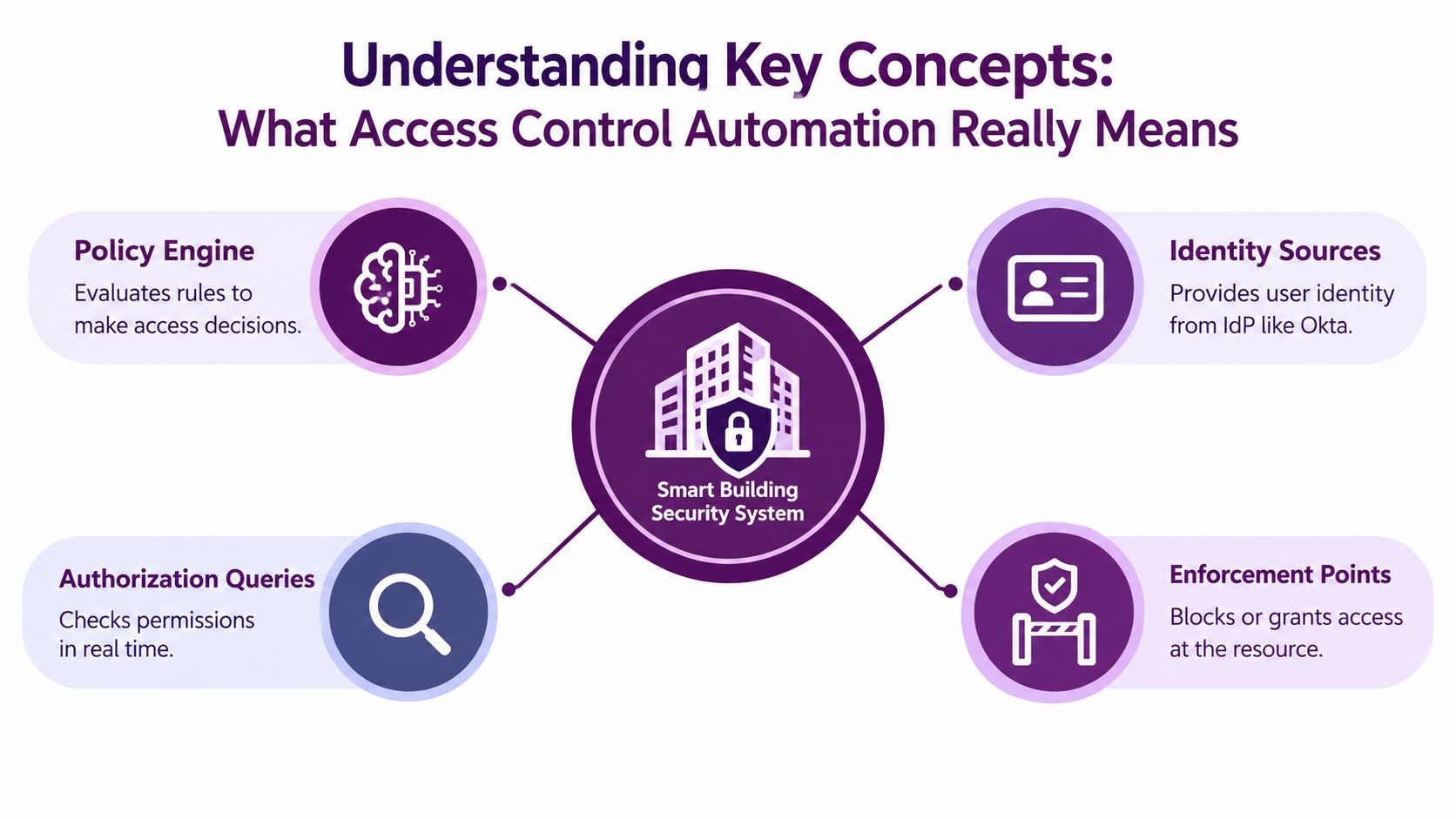
The four parts of an automated decision
-
Identity sources provide context. An identity provider such as Okta, an HR system, a device directory, a service registry, or an application database supplies facts about the requester. Those facts might include department, employment status, team, project, or authentication strength.
-
A policy engine evaluates the request. It reads rules such as “members of the finance team may approve invoices” or “contractors may access this project only during an approved assignment.” The engine should return a decision that another system can understand, rather than leaving the rule buried in application code.
-
An authorization query asks a focused question. A service might ask whether a particular user can export a report, edit a customer record, or administer a workflow. The answer should consider the identity, resource, action, and relevant context.
-
An enforcement point applies the result. The application, API gateway, database, ERP, or privileged access layer grants or blocks the action. The policy engine decides, but the enforcement point makes that decision real.
NIST's SP 800-210, published in July 2020, formalized how organizations should enforce authorization in cloud systems at scale (NIST cloud access-control guidance). NIST's broader ABAC guidance describes authorization through subject, object, operation, and environmental attributes. Together, these ideas move access administration away from manually maintained permissions and toward machine-readable, policy-driven decisions.
The important distinction is between provisioning and authorization. Provisioning creates or removes an account or entitlement. Authorization evaluates whether an action is allowed at the moment it occurs. Mature programs use both, because an account can exist while a specific operation remains prohibited.
Comparing Automation Approaches
RBAC, ABAC, and just-in-time access solve different problems. Choosing among them isn't a matter of finding the most advanced model. It's about matching the control to the stability of your roles, the quality of your attributes, and the sensitivity of the resource.
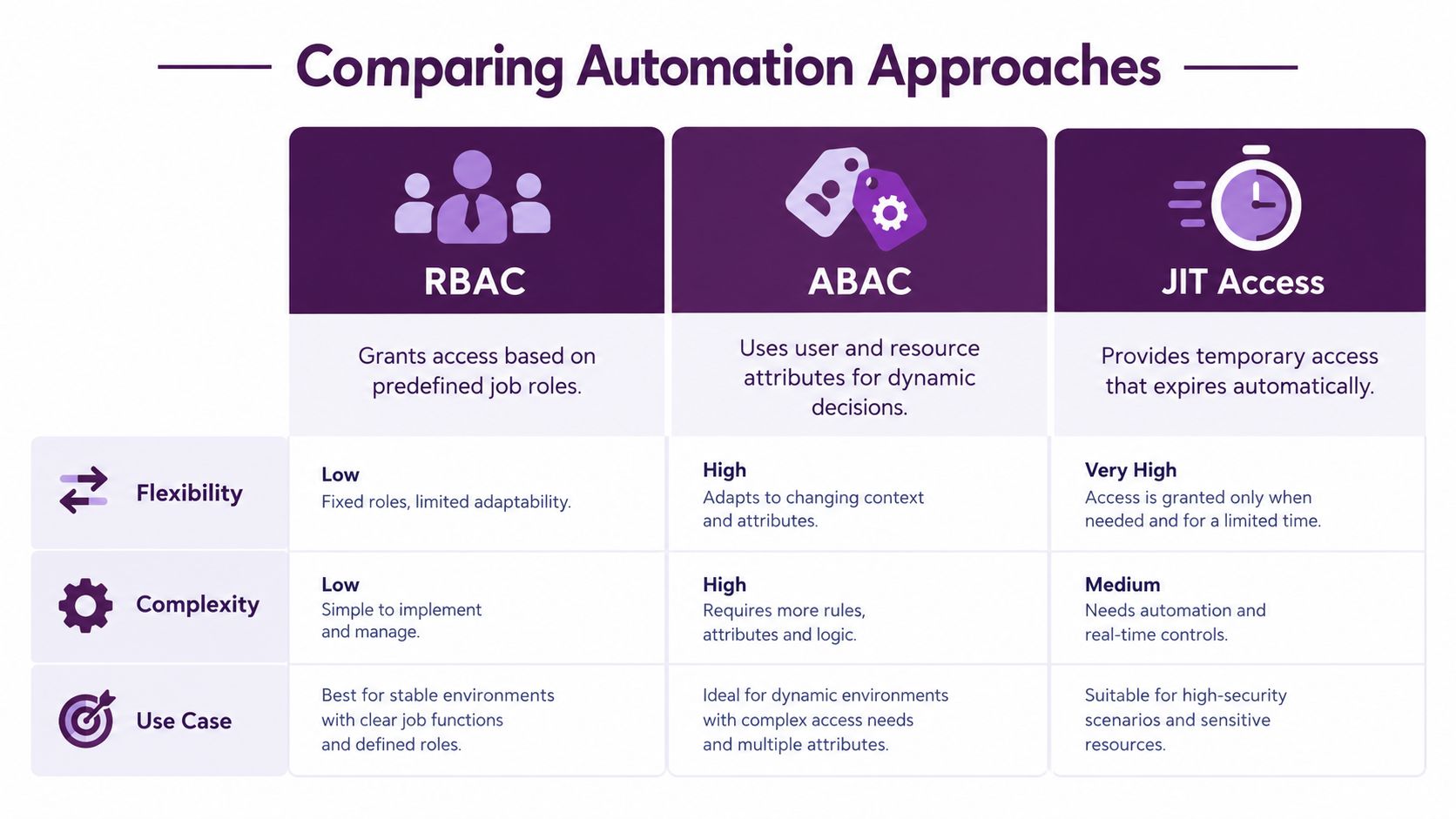
| Approach | How it decides | Where it fits | Main challenge |
|---|---|---|---|
| RBAC | Assigns permissions to predefined roles | Stable job functions and repeatable access bundles | Roles can become difficult to maintain when exceptions accumulate |
| ABAC | Evaluates attributes about the subject, resource, action, and context | Dynamic access across teams, projects, regions, and data classifications | Rules depend on accurate, consistent attributes |
| JIT access | Grants temporary access for an approved need | Privileged operations, incident response, and sensitive administration | The decision path must remain available when access is urgently needed |
RBAC keeps common access understandable
Suppose a new sales representative joins. An RBAC workflow can assign a sales role that includes the appropriate CRM permissions, collaboration groups, and reporting access. This is easy for administrators to explain and easy for auditors to review.
RBAC struggles when organizations create a new role for every exception. A representative who supports one strategic account, works across regions, or needs a temporary finance permission may collect additional roles until nobody can explain the effective access. Treat RBAC as a baseline, not a complete answer.
ABAC handles changing context
ABAC can evaluate conditions such as department, project membership, data sensitivity, device state, or working context. A policy might allow a project member to view a specific class of records while blocking exports, or permit access only when the request comes from a managed device.
That flexibility comes with an engineering obligation. Attributes must have clear owners, reliable values, and defined behavior when data is missing. If “project status” is stale, the policy can be perfectly written and still produce the wrong outcome.
JIT limits standing privilege
JIT access grants permission for a specific task and removes it when the approved period or condition ends. It's useful for database administration, production troubleshooting, and emergency response, where permanent privilege creates unnecessary exposure.
JIT also changes the operational question. Instead of asking whether an engineer has access forever, the team asks who needs access now, why, which resource is involved, who approved it, and how the system will revoke it. A strong design often combines all three models. RBAC supplies ordinary access, ABAC adds context, and JIT protects sensitive actions.
<iframe width="100%" style="aspect-ratio: 16 / 9;" src="https://www.youtube.com/embed/7CG5VQafaTI" frameborder="0" allow="autoplay; encrypted-media" allowfullscreen></iframe>Integration Patterns Across SaaS and ERP Systems
A policy engine can make an excellent decision and still fail operationally if the target systems don't apply it consistently. SaaS applications usually offer modern APIs and provisioning standards, while older ERP platforms may require a gateway, custom adapter, scheduled import, or carefully controlled administrative interface.
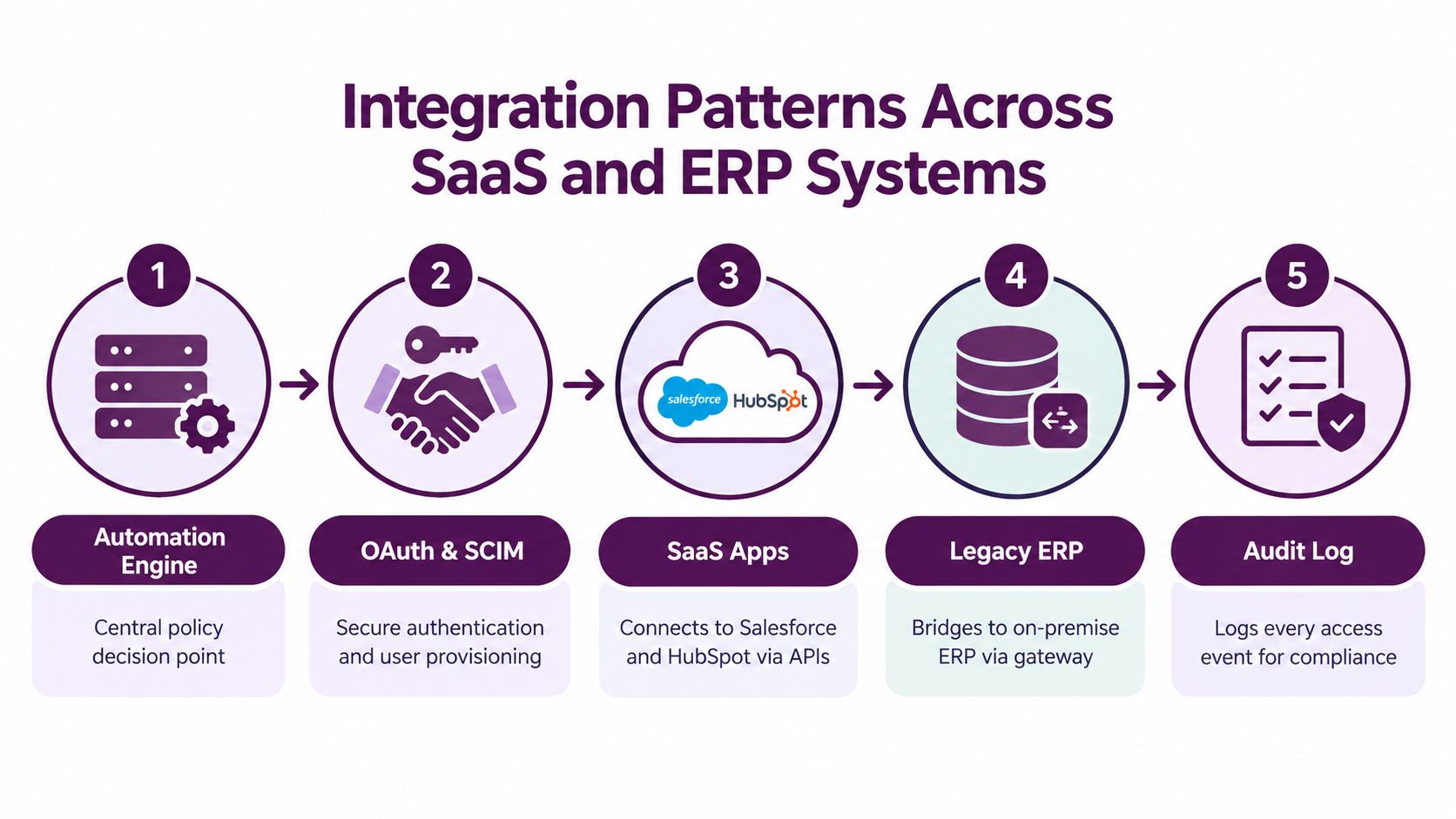
A practical integration flow
First, establish a system of record. HR or an authoritative workforce directory should provide employment status, department, manager, and role inputs. Don't let each SaaS application become an independent source of truth.
Second, normalize identity data. Map different field names and values into a shared model. “Finance,” “FIN,” and “Accounting” shouldn't accidentally represent different policy outcomes if they describe the same organizational function.
Third, connect the decision layer. OAuth allows an integration to authenticate to an application with defined scopes. SCIM can support standardized user and group provisioning where the target application supports it. For systems without suitable standards, build a custom API adapter or place a gateway between the automation engine and the ERP.
Teams working through OAuth design details can use these OAuth integration examples as a practical reference.
Fourth, translate decisions into actions. A mover event might cause the engine to remove an old CRM group, add a new one, update an ERP responsibility, and request approval for a sensitive permission. Each connector should return success, failure, and enough detail for retry handling.
Finally, record the complete transaction. Log the source event, policy version, decision, target system, resulting change, and revocation status. A successful API response doesn't prove that the user has the intended effective access, so reconciliation should compare expected entitlements with observed state.
Joiner, mover, and leaver events should connect to periodic reviews and deprovisioning. Policy-driven workflows need to remove access when a role, contract, or project status changes, rather than waiting for an administrator to notice the discrepancy (identity governance and least privilege guidance).
The overlooked integration problem is not granting access. It's proving that every system received, applied, and later removed the decision.
Design connectors for rate limits, pagination, partial failure, expired tokens, and duplicate events. For ERP systems, add a reconciliation job because an on-premise administrator may change access outside the automation path.
Security and Audit Considerations
Automation improves security only when its decisions remain governed. A workflow that grants access quickly still needs expiration, approval boundaries, logging, and failure handling. Otherwise, an incorrect rule can spread through connected SaaS and ERP systems faster than a person could correct it.
Cloud Security Alliance Zero Trust guidance recommends measuring privileged access delivered through just-in-time elevation and monitoring dormant or orphaned accounts. These indicators help security teams determine whether automation is reducing standing privilege or merely placing manual approvals behind a new interface.
Build evidence into the workflow
Audit records should let an investigator reconstruct the decision without collecting screenshots from separate systems. Record:
- Who requested access: the human, service account, or agent identity.
- What was requested: the resource, action, scope, and purpose.
- Why it was allowed: the policy result and relevant decision context.
- Who approved it: the approver and approval condition, when required.
- What changed: the target system response and resulting entitlement.
- When it ended: the expiration, revocation, or remediation event.
The record should also connect related events across systems. For example, an approval in an identity provider may produce a group change in a SaaS application and a responsibility update in an ERP platform. Store a shared transaction identifier so reviewers can follow that chain and identify where a connector failed or a target system applied only part of the decision. This evidence supports practical compliance for client proposals by making file and system access controls easier to describe and substantiate.
Verify policies before production
Policy drift occurs when application permissions change, attribute ownership becomes unclear, or a connector behaves differently after an update. Periodic attestations should compare live entitlements with the minimum access expected for the person's current role, then route exceptions for remediation.
NIST's Access Control Policy Tool demonstrates that automation can support policy design as well as runtime enforcement. GUI templates, model checking, generated test suites, and XACML output help teams examine policy behavior before deployment. Treat the tool as a test bench: validate expected decisions first, then connect enforcement points.
AI-agent workflows add another audit boundary. Record the human requester and the agent acting on that person's behalf, limit delegated scopes, require approval for sensitive actions, and make revocation independent of the agent's behavior. Teams examining these AI access control patterns can apply the same separation to agent-enabled workflows.
Implementation Roadmap for Engineering Teams
A successful program starts smaller than vendor diagrams suggest. Choose a limited group of identities, one representative SaaS application, and one sensitive workflow. This pilot should reveal data quality problems, connector behavior, approval rules, and rollback needs before the team connects the wider environment.
Phase 1: Discovery and role modeling
Begin with an entitlement inventory. Identify identity sources, target applications, privileged groups, service accounts, manual approval paths, and existing review cycles. For each permission, record its business purpose, owner, source of truth, expected users, and removal condition.
Model access around current tasks rather than historical accumulation. Ask what a person needs to perform the job, which permissions are exceptional, and which actions should require temporary elevation. Keep the first role catalog understandable. A role that nobody can explain should not become an automation dependency.
Useful discovery outputs include:
- A system map: Identity provider, HR source, SaaS applications, ERP interfaces, and enforcement points.
- A role baseline: Minimum permissions for common job functions.
- An exception register: Temporary, project-based, emergency, and incompatible access.
- A data ownership matrix: Owner for each attribute and entitlement.
- A rollback plan: Manual recovery steps if an automated change is wrong.
Phase 2: Proof of concept
Select a policy engine that supports the decision model the team needs. An RBAC pilot may use an identity governance platform, while application authorization may call a dedicated engine such as Cerbos or an equivalent service. The goal is to prove that decisions are explainable, testable, and enforceable, not to choose the largest platform.
Create a small policy set with positive, negative, boundary, and missing-data tests. Include a new hire, a department change, a terminated user, a contractor with an expiration, and a privileged request without approval. These cases work like a vehicle inspection course: ordinary turns matter, but failures at the edges reveal whether the design is safe.
A policy automation project from NIST offers a useful model for this phase. Policy templates, model checking, generated test suites, and XACML output show how teams can automate policy construction and verification instead of hand-editing every rule. Use that approach as a test bench before connecting enforcement points.
Phase 3: Connector development and sandbox testing
Connect the identity provider first, then add one SaaS target and one ERP path. Use OAuth with the narrowest practical scopes, SCIM where supported, and custom adapters where legacy systems require them. Teams comparing orchestration options can consult this API integration platform guide to evaluate how connectors and workflows should coordinate.
Test more than the successful path:
- Event duplication: Send the same lifecycle event more than once and confirm that the connector remains safe.
- Partial failure: Let the SaaS update succeed while the ERP update fails, then verify retry and alert behavior.
- Revocation: Remove the source role and confirm that every downstream entitlement is addressed.
- Rate limiting: Confirm that queues back off without losing the original decision.
- Attribute gaps: Test what happens when department, project, or manager data is missing.
- Emergency access: Verify approval, expiration, logging, and manual break-glass recovery.
Keep sandbox credentials and test identities separate from production. Store policy versions with deployment metadata so an incident responder can identify which rule produced a decision. This record connects a policy result to the connector that acted on it, which is often the missing link in real deployments.
Phase 4: Controlled production rollout
Start with read-only discovery or recommendation mode. Compare proposed changes with current entitlements, ask application owners to review exceptions, and correct identity data before enabling automatic writes.
Move one workflow at a time into enforcement. Monitor denied requests, failed connector calls, unexpected role changes, stale accounts, and temporary access that was not revoked. Give support teams a clear escalation path, while keeping exceptions temporary and visible.
A production checklist should include:
- Owner assignment: Someone owns each policy, connector, and target-system mapping.
- Approval boundaries: Sensitive actions have explicit human approval rules.
- Evidence capture: Decisions, changes, and revocations enter a searchable audit trail.
- Reconciliation: Expected and observed entitlements are compared regularly.
- Rollback: The team can disable a policy or connector without removing the entire control plane.
- Review cadence: Policies and role baselines are revisited when business structure changes.
For AI agents and non-human identities, create a separate identity class rather than forcing every workload into a human employee model. Record the originating user, agent identity, credential or delegation grant, allowed tools, resource scope, and revocation condition. A human onboarding workflow can be safe while the equivalent machine-identity workflow remains over-permissioned, so these records and controls must be tested separately.
Real World Examples and Benefits
A realistic deployment doesn't begin by automating every application. One team might connect its HR source to an identity provider, then automate onboarding for a SaaS CRM and a finance application while leaving a legacy ERP in reconciliation mode. The immediate benefit is consistency, but the harder work appears in the exceptions.
A CRM connector may impose rate limits. An ERP adapter may accept a request without immediately confirming the effective permission. A role may look clean on paper while employee records contain inconsistent department or project values. Teams address these issues with queues, retries, reconciliation, attribute ownership, and explicit exception handling.
Another team might use RBAC for ordinary sales access, ABAC for project-specific data, and JIT approval for production administration. That combination keeps common access predictable without giving every employee permanent access to sensitive operations.
Don't promise automation just because an integration can call an API. The meaningful result is a repeatable chain from trusted event to policy decision, enforcement, revocation, and evidence. Teams report measurable improvements when they remove manual bottlenecks, but the outcome depends on connector quality and governance discipline.
Conclusion and Next Steps
Access control automation works when policy, identity data, enforcement, and evidence operate as one system. RBAC provides a manageable baseline, ABAC adds context, and JIT access limits sensitive privilege to an approved need.
Start with one workflow, model the minimum access required, test negative and failure cases, and connect revocation to the same lifecycle events that trigger provisioning. Measure dormant accounts, temporary privileged access, failed connector actions, and unresolved exceptions instead of relying on a vague claim that the environment is automated.
Engineering teams should treat policy templates and generated tests as deployment artifacts, not documentation written after the fact. A small, observable pilot will reveal more than a broad rollout built on incomplete attributes and untested connectors.
Supercenter provides AI coworkers inside Slack and Microsoft Teams that act through scoped OAuth connections across business tools, with delegated permissions, approval rules, and replayable action logs. Visit Supercenter to see how controlled, auditable automation can connect everyday workflows across SaaS and ERP systems.
- access control automation
- RBAC
- ABAC
- SaaS integration
- security audit